
Translation Using Vector Notation by Malin Christersson
Loading the math board and drawing, please wait…
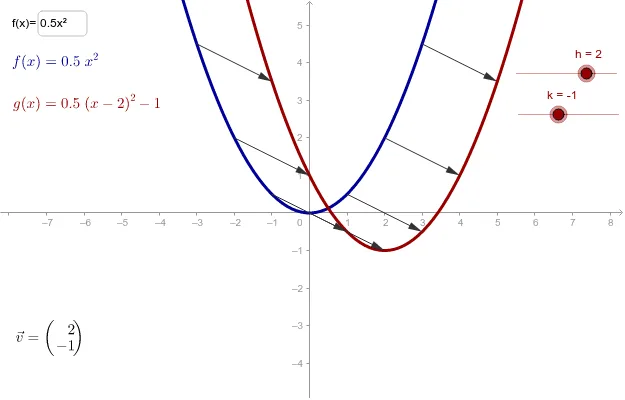
This example demonstrates how to represent translation using vector notation. Key mathematical concepts include translation transformation and trigonometric functions. By constructing vectors and functions, users can visually understand the effect of translation on function graphs. Mainly uses TextField, Vector, Function, etc., GeoGebra commands.
GeoGebra Commands & Parameters
Textfield(f) → inputBox1Vector(B1, (x(B1) + h, y(B1) + k)) → C1Vector(B2, (x(B2) + h, y(B2) + k)) → C2Vector(B3, (x(B3) + h, y(B3) + k)) → C3Vector(B4, (x(B4) + h, y(B4) + k)) → C4Vector(B5, (x(B5) + h, y(B5) + k)) → C5Vector(B6, (x(B6) + h, y(B6) + k)) → C6Vector(B7, (x(B7) + h, y(B7) + k)) → C7Vector(B8, (x(B8) + h, y(B8) + k)) → C8Vector(B9, (x(B9) + h, y(B9) + k)) → C9Vector(B10, (x(B10) + h, y(B10) + k)) → C10Vector(B11, (x(B11) + h, y(B11) + k)) → C11Vector(B12, (x(B12) + h, y(B12) + k)) → C12Vector(B13, (x(B13) + h, y(B13) + k)) → C13Vector(B14, (x(B14) + h, y(B14) + k)) → C14Vector(B15, (x(B15) + h, y(B15) + k)) → C15Vector(B16, (x(B16) + h, y(B16) + k)) → C16Vector(B17, (x(B17) + h, y(B17) + k)) → C17
AI Drawing Prompt Reference
Draw a function graph and represent translation using vectors. First, input a function expression, then create multiple points on the function graph. Use vectors to show the translation from these points, where the endpoint of each vector is the original point plus a fixed translation vector (h, k), demonstrating the translation effect.
The prompt above was compiled from the original drawing commands and is for reference only.