
Translation in the Coordinate Plane
Loading the math board and drawing, please wait…
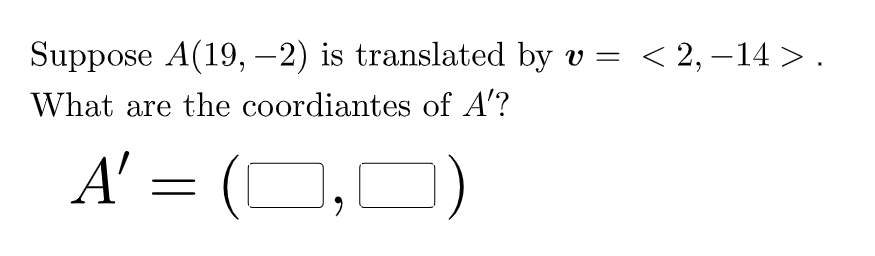
This example demonstrates geometric transformations in the coordinate plane. Key mathematical concepts include vector translation, coordinate transformation, and symmetry. Construction involves using GeoGebra commands like Random, Vector, Textfield, and If to create translation objects, and InputBox and Slider for dynamic adjustments. Suitable for middle school students learning geometric transformations or high school students practicing coordinate geometry.
GeoGebra Commands & Parameters
Random(-20, 20) → gRandom(-20, 20) → hRandom(-20, 20) → iRandom(-20, 20) → jRandom(-20, 20) → kRandom(-20, 20) → lVector((i, j)) → uVector(A, B) → vTextfield(a) → InputBox1Textfield(b) → InputBox2If(correct, "√", "X") → text8
AI Drawing Prompt Reference
Create a coordinate-plane geometric transformation example. Randomly choose values between -20 and 20 to define two vectors: one vector is formed from two chosen components, and a second vector represents the reference translation vector using another pair of components. Add two text input fields to enter or display two variables related to the coordinate transformation. Include a status symbol area that shows “√” when a correctness condition holds and “X” otherwise. The figure should emphasize the vector-translation relationship and allow dynamic adjustment through the inputs.
The prompt above was compiled from the original drawing commands and is for reference only.