
Translation and Vector Application
Loading the math board and drawing, please wait…
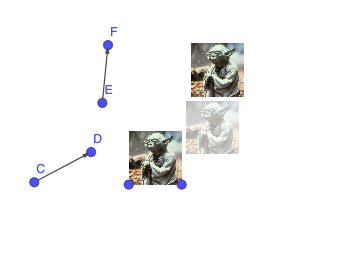
This example demonstrates vector translation using GeoGebra, utilizing vector tools to achieve geometric translation. Core math concepts include vectors, translation transformations, and coordinate geometry. Key construction points involve the Vector and Translate commands for creating vectors and translating objects. Suitable for high school students learning vectors and geometric transformations.
GeoGebra Commands & Parameters
Vector(C, D) → uVector(E, F) → vTranslate(pic1, u) → pic1'Translate(pic1', v) → pic1''
AI Drawing Prompt Reference
On a coordinate plane, prepare a planar figure object called pic1 that can be translated. Choose two sets of points to define two displacement vectors: construct vector u from points C and D, and construct vector v from points E and F. Translate pic1 by vector u to obtain its new position pic1'. Then translate pic1' by vector v to get the final figure pic1''. Emphasize the sequential application of the two vectors as translation steps.
The prompt above was compiled from the original drawing commands and is for reference only.