
Translating Trapezoids and Congruence in GeoGebra
Loading the math board and drawing, please wait…
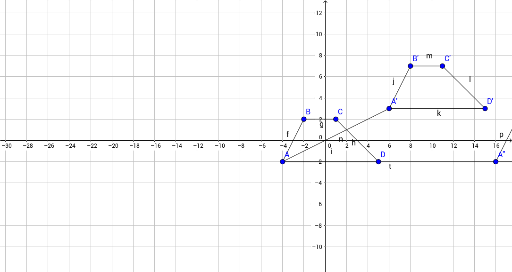
This GeoGebra example demonstrates the translation of a trapezoid in the plane, showing how the original quadrilateral ABCD and its translated image remain congruent under a rigid motion. Core mathematical concepts include polygons (specifically trapezoids), geometric transformations (translation), congruence, and segment-based construction. The construction uses the GeoGebra Segment command to connect points A, B, C, and D into the original trapezoid, then generates translated points A′, B′, C′, D′ and second images A″, B″, C″, D″, with auxiliary segments j, k, l, m, n illustrating the correspondence between pre-image and image. Suitable for middle school geometry lessons on transformations and congruence, and as a visual introduction to function graph translation in high school mathematics.
GeoGebra Commands & Parameters
Segment(B, A) → fSegment(B, C) → gSegment(C, D) → hSegment(D, A) → iSegment(B', A') → jSegment(A', D') → kSegment(D', C') → lSegment(C', B') → mSegment(A, A') → nSegment(B'', A'') → pSegment(A'', D'') → qSegment(D'', C'') → rSegment(C'', B'') → sSegment(A, A'') → t
AI Drawing Prompt Reference
Draw a trapezoid by connecting four points to form the original quadrilateral. Label its vertices and outline the shape. Then apply a translation to move the trapezoid to a new location, creating a congruent copy. Draw auxiliary segments linking each original vertex to its corresponding translated vertex, and also connect the two translated copies to show the correspondence. Include a translation vector to indicate the direction and distance of the shift. Ensure the original and both images remain congruent, illustrating a rigid motion. The construction should clearly show the pre‑image, the first translated image, and the second translated image with all connecting segments visible.
The prompt above was compiled from the original drawing commands and is for reference only.