
Reflection Trapezoid
Loading the math board and drawing, please wait…
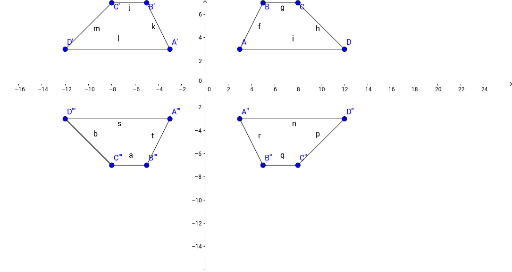
This example demonstrates the transformation of a trapezoid after reflection. It involves core mathematical concepts such as reflection, trapezoid, coordinate geometry, and geometric transformations. The construction uses commands like Segment, Points, and Functions. Suitable for high school students learning geometric transformations and coordinate geometry.
GeoGebra Commands & Parameters
Segment(A, B) → fSegment(B, C) → gSegment(C, D) → hSegment(D, A) → iSegment(C', B') → jSegment(B', A') → kSegment(A', D') → lSegment(D', C') → mSegment(A'', D'') → nSegment(D'', C'') → pSegment(C'', B'') → qSegment(B'', A'') → rSegment(D''', A''') → sSegment(A''', B''') → tSegment(B''', C''') → aSegment(C''', D''') → b
AI Drawing Prompt Reference
Draw a trapezoid and its reflection to demonstrate the transformation. Show the original and reflected trapezoids with their corresponding sides, ensuring parallelism. Start by drawing the four sides of the original trapezoid, then draw the four sides of the reflected trapezoid, and finally connect the corresponding vertices of the original and reflected trapezoids to visualize the reflection transformation.
The prompt above was compiled from the original drawing commands and is for reference only.