
Translate a Triangle
Loading the math board and drawing, please wait…
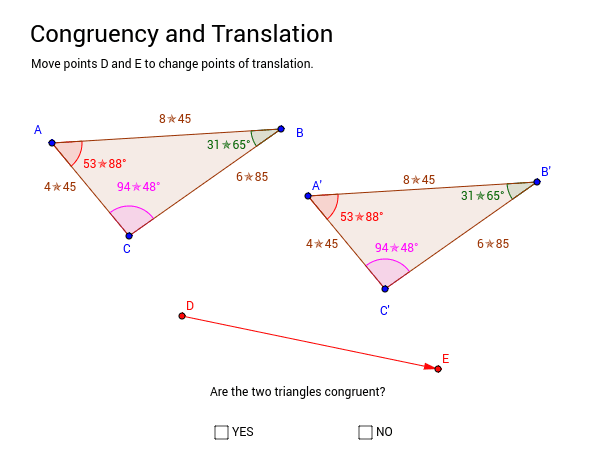
This applet demonstrates how to translate a triangle along a vector and displays the length and angle values of the resulting triangle for comparison. Students can visually understand the properties of translation transformation through manipulation. Key math concepts include vectors, geometric transformations, and triangle properties. Construction highlights the use of GeoGebra commands like Polygon, Angle, Vector, and Translate to create the triangle, measure angles, define vectors, and perform translations. Suitable for middle school and above students learning about geometric transformations and vectors.
GeoGebra Commands & Parameters
Polygon(A, B, C) → poly1, c, a, bAngle(C, A, B) → α_1Angle(B, C, A) → γAngle(A, B, C) → ζVector(D, E) → uTranslate(A, u) → A'Translate(B, u) → B'Translate(C, u) → C'Polygon(A', B', C') → poly1', c', a', b'Angle(C', A', B') → αAngle(A', B', C') → βAngle(B', C', A') → δ
AI Drawing Prompt Reference
Draw a triangle ABC, then translate it along vector u and measure the angles and side lengths of the new triangle A'B'C'. Compare the angles and side lengths of the original and new triangles.
The prompt above was compiled from the original drawing commands and is for reference only.