
Transformation Station: Reflection Exploration (Vertical, Horizontal, 45° Diagon
Loading the math board and drawing, please wait…
In collections
Transformations Stations
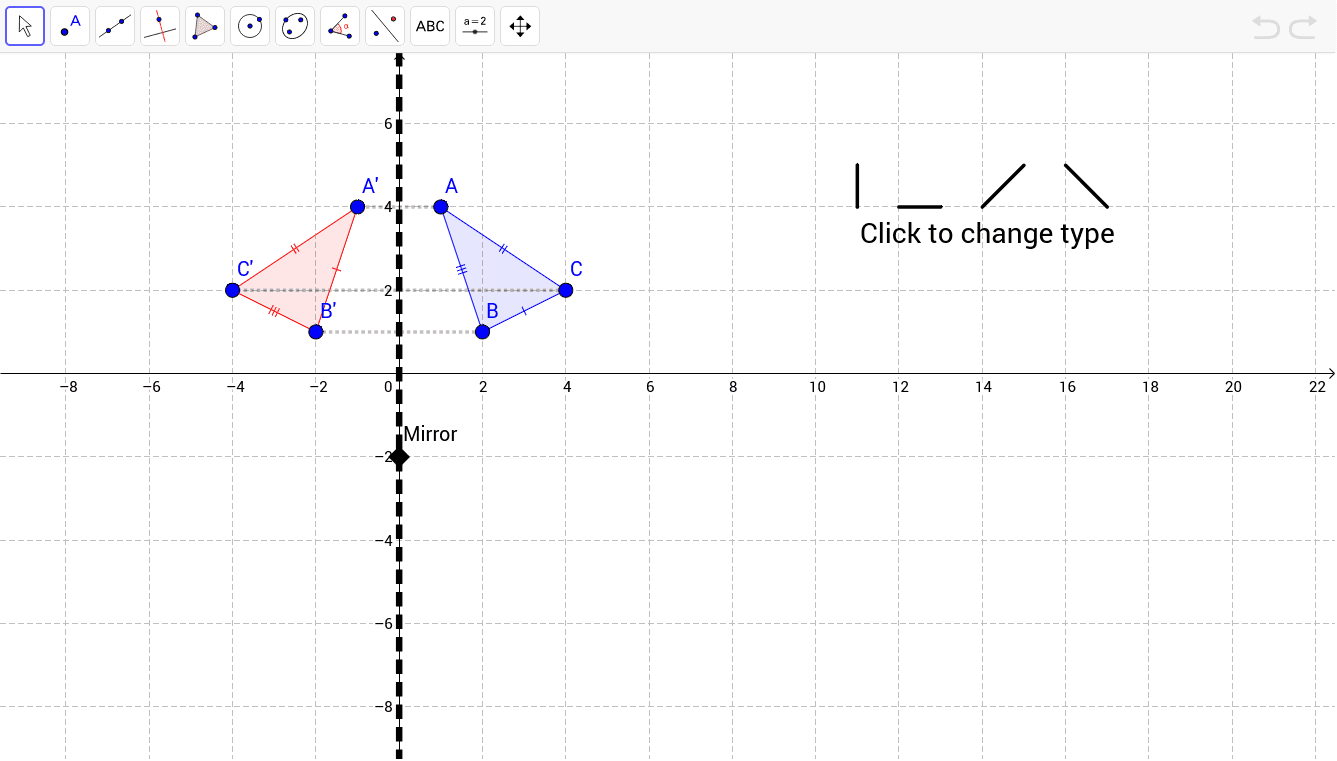
① This dynamic geometry example demonstrates reflection transformations of a polygon across vertical, horizontal, and 45-degree diagonal axes, allowing students to observe how the image changes position while preserving shape and size. ② Core mathematical concepts include axial symmetry (reflection), transformation matrices, and properties of rigid motions, with additional focus on polygons such as rhombi. ③ Construction details: using GeoGebra commands Polygon, Segment, and Line to create the original polygon and reflection axes, then applying the Mirror command to generate the reflected polygon and segments, with text labels (e.g., A', B', C') for key points. The construction involves multiple points, lines, and auxiliary objects. ④ Suitable for middle school to high school students learning geometric transformations, and useful for teachers demonstrating reflection principles and coordinate changes, laying groundwork for matrix transformations.
GeoGebra Commands & Parameters
Polygon(A, B, C) → poly1, c, a, bSegment(D, E) → dSegment(F, G) → eSegment(H, I) → fLine(J, If[vert, x = 0, If[horiz, y = 0, If[diag, y = x, y = -x]]]) → gSegment(K, L) → hMirror(A, g) → A'Mirror(B, g) → B'Mirror(C, g) → C'Polygon(A', B', C') → poly1', c', a', b'Segment(C, C') → iSegment(A, A') → jSegment(B', B) → k
AI Drawing Prompt Reference
Draw a polygon and create vertical, horizontal, and 45-degree diagonal reflection axes. Reflect the polygon across these axes to obtain three different reflected polygons. Connect the original vertices to their corresponding reflected vertices with auxiliary line segments to illustrate the reflection transformation process. Label the key points and reflection axes clearly to indicate the positions of the original and reflected vertices.
The prompt above was compiled from the original drawing commands and is for reference only.