
Transformations and Congruence 5
Loading the math board and drawing, please wait…
In collections
Transformations and Congruence Activities 1-7
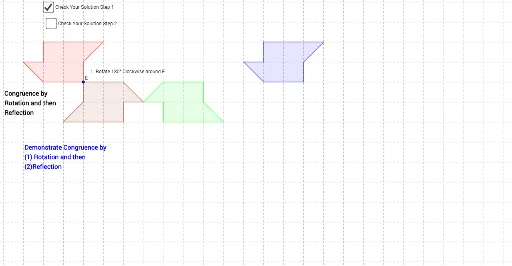
This example demonstrates the process of achieving geometric congruence through transformations (rotation, reflection). Key math concepts include congruence, transformation matrices, and trigonometry. GeoGebra commands like Polygon, Rotate, and Mirror are used to construct and manipulate geometric objects. Suitable for high school mathematics education to understand the relationship between transformations and congruence.
GeoGebra Commands & Parameters
Polygon(A, B, C, D, E, F, G) → poly1, a, b, c, d, e, f, gRotate(A, 180°, E) → A'Rotate(B, 180°, E) → B'Rotate(C, 180°, E) → C'Rotate(D, 180°, E) → D'Rotate(E, 180°, E) → E'Rotate(F, 180°, E) → F'Rotate(G, 180°, E) → G'Polygon(A', B', C', D', E', F', G') → poly1', a', b', c', d', e', f', g'Segment(H, I) → hMirror(A', h) → A''Mirror(B', h) → B''Mirror(C', h) → C''Mirror(D', h) → D''Mirror(E', h) → E''Mirror(F', h) → F''Mirror(G', h) → G''Polygon(A'', B'', C'', D'', E'', F'', G'') → poly1'', a'', b'', c'', d'', e'', f'', g''Polygon(A_1, B_1, C_1, D_1, E_1, F_1, G_1) → poly1_1, a_1, b_1, c_1, d_1, e_1, f_1, g_1Rotate(E_1, 180°, E_1) → E'_1
AI Drawing Prompt Reference
Draw a heptagon, then rotate it 180 degrees around point E to create a new heptagon. Next, use line segment HI as the mirror to reflect the new heptagon, generating another new heptagon. Finally, rotate this new heptagon 180 degrees around point E to get the final heptagon.
The prompt above was compiled from the original drawing commands and is for reference only.