
Tessellations Using Rotations
Loading the math board and drawing, please wait…
In collections
Tessellations Using Reflections, Rotations, and Translations
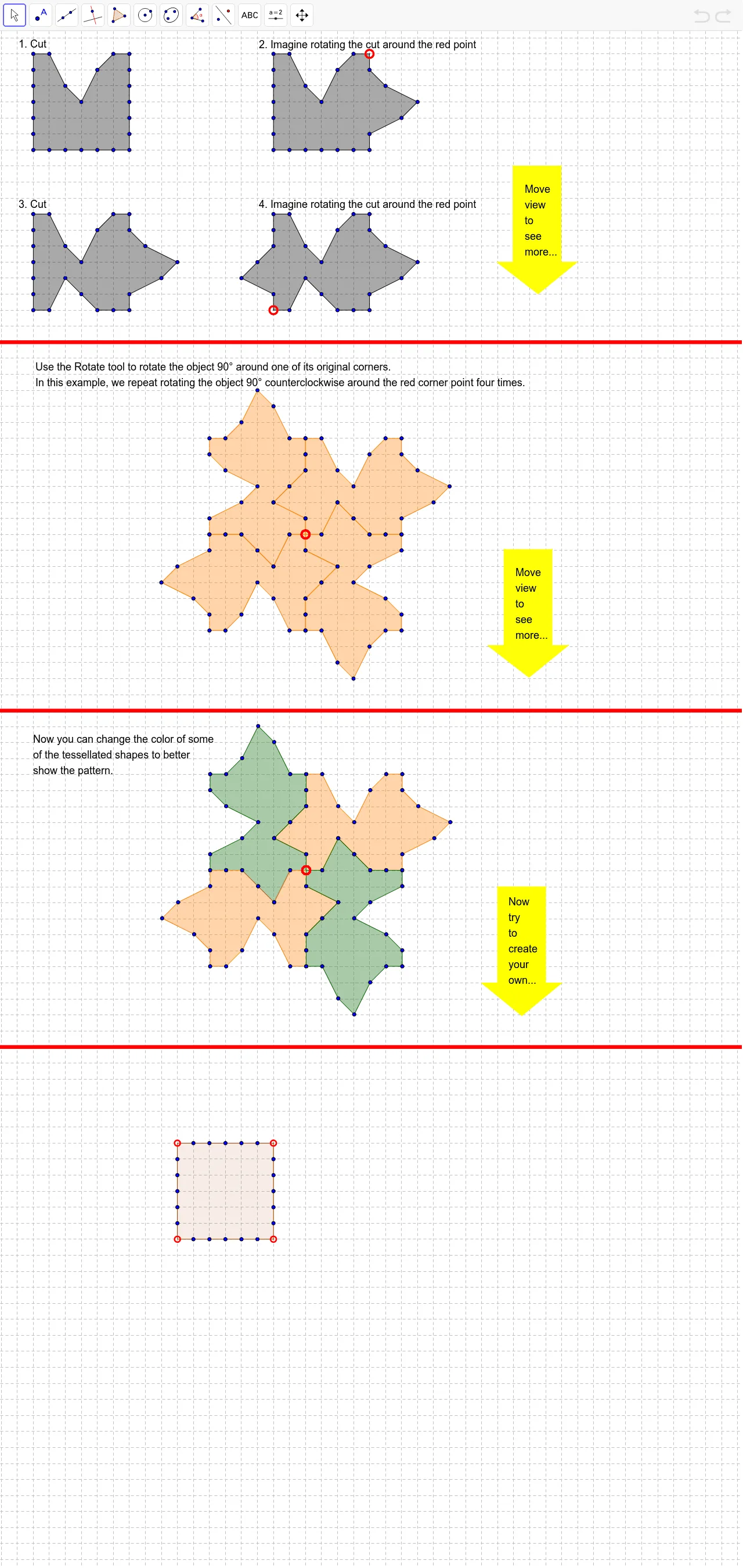
This example demonstrates how to create tessellations using rotation transformations. Key mathematical concepts include rotation, transformation, and geometric construction. Using commands like Polygon, Line, and Rotate, users can create complex tessellation patterns. Suitable for middle school and above students or teachers for geometry education.
GeoGebra Commands & Parameters
Polygon(A, B, K, L, M, N, O, P, Q, R, S, T, C, U, V, W, Z, D, E, F, G, H, I, J) → poly1, a, j, k, l, m, n, o, p, q, r, s, b, t, u, v, w, z, c, d, e, f, g, h, iPolygon(A_1, B_1, K_1, L_1, M_1, N_1, O_1, P_1, Q_1, R_1, S_1, T_1, C_1, U_1, V_1, W_1, Z_1, D_1, E_1, F_1, G_1, H_1, I_1, J_1) → poly1_1, a_1, j_1, k_1, l_1, m_1, n_1, o_1, p_1, q_1, r_1, s_1, b_1, t_1, u_1, v_1, w_1, z_1, c_1, d_1, e_1, f_1, g_1, h_1, i_1Polygon(A_2, B_2, K_2, L_2, M_2, N_2, O_2, P_2, Q_2, R_2, S_2, T_2, C_2, U_2, V_2, W_2, Z_2, D_2, E_2, F_2, G_2, H_2, I_2, J_2) → poly1_2, a_2, j_2, k_2, l_2, m_2, n_2, o_2, p_2, q_2, r_2, s_2, b_2, t_2, u_2, v_2, w_2, z_2, c_2, d_2, e_2, f_2, g_2, h_2, i_2Polygon(A_3, B_3, K_3, L_3, M_3, N_3, O_3, P_3, Q_3, R_3, S_3, T_3, C_3, U_3, V_3, W_3, Z_3, D_3, E_3, F_3, G_3, H_3, I_3, J_3) → poly1_3, a_3, j_3, k_3, l_3, m_3, n_3, o_3, p_3, q_3, r_3, s_3, b_3, t_3, u_3, v_3, w_3, z_3, c_3, d_3, e_3, f_3, g_3, h_3, i_3Polygon(A_4, B_4, K_4, L_4, M_4, N_4, O_4, P_4, Q_4, R_4, S_4, T_4, C_4, U_4, V_4, W_4, Z_4, D_4, E_4, F_4, G_4, H_4, I_4, J_4) → poly1_4, a_4, j_4, k_4, l_4, m_4, n_4, o_4, p_4, q_4, r_4, s_4, b_4, t_4, u_4, v_4, w_4, z_4, c_4, d_4, e_4, f_4, g_4, h_4, i_4Line(A_5, B_5) → a_5Polygon(C_5, D_5, E_5, F_5, G_5, H_5, I_5) → poly2, c_5, d_5, e_5, f_5, g_5, h_5, i_5Rotate(A_4, 90°, M_4) → J_5Rotate(B_4, 90°, M_4) → K_5Rotate(C_4, 90°, M_4) → L_5Rotate(D_4, 90°, M_4) → M_5Rotate(E_4, 90°, M_4) → N_5Rotate(F_4, 90°, M_4) → O_5Rotate(G_4, 90°, M_4) → P_5Rotate(H_4, 90°, M_4) → Q_5Rotate(I_4, 90°, M_4) → R_5Rotate(J_4, 90°, M_4) → S_5Rotate(K_4, 90°, M_4) → T_5Rotate(L_4, 90°, M_4) → U_5Rotate(M_4, 90°, M_4) → V_5Rotate(N_4, 90°, M_4) → W_5Rotate(O_4, 90°, M_4) → Z_5Rotate(P_4, 90°, M_4) → A_6Rotate(Q_4, 90°, M_4) → B_6Rotate(R_4, 90°, M_4) → C_6Rotate(S_4, 90°, M_4) → D_6Rotate(T_4, 90°, M_4) → E_6Rotate(U_4, 90°, M_4) → F_6Rotate(V_4, 90°, M_4) → G_6Rotate(W_4, 90°, M_4) → H_6Rotate(Z_4, 90°, M_4) → I_6Polygon(J_5, K_5, T_5, U_5, V_5, W_5, Z_5, A_6, B_6, C_6, D_6, E_6, L_5, F_6, G_6, H_6, I_6, M_5, N_5, O_5, P_5, Q_5, R_5, S_5) → poly3, j_5, s_5, t_5, u_5, v_5, w_5, z_5, a_6, b_6, c_6, d_6, k_5, e_6, f_6, g_6, h_6, i_6, l_5, m_5, n_5, o_5, p_5, q_5, r_5Rotate(J_5, 90°, M_4) → J_6Rotate(K_5, 90°, M_4) → K_6Rotate(L_5, 90°, M_4) → L_6Rotate(M_5, 90°, M_4) → M_6Rotate(N_5, 90°, M_4) → N_6Rotate(O_5, 90°, M_4) → O_6Rotate(P_5, 90°, M_4) → P_6Rotate(Q_5, 90°, M_4) → Q_6Rotate(R_5, 90°, M_4) → R_6Rotate(S_5, 90°, M_4) → S_6Rotate(T_5, 90°, M_4) → T_6Rotate(U_5, 90°, M_4) → U_6Rotate(V_5, 90°, M_4) → V_6Rotate(W_5, 90°, M_4) → W_6Rotate(Z_5, 90°, M_4) → Z_6Rotate(A_6, 90°, M_4) → A_7Rotate(B_6, 90°, M_4) → B_7Rotate(C_6, 90°, M_4) → C_7Rotate(D_6, 90°, M_4) → D_7Rotate(E_6, 90°, M_4) → E_7Rotate(F_6, 90°, M_4) → F_7Rotate(G_6, 90°, M_4) → G_7Rotate(H_6, 90°, M_4) → H_7Rotate(I_6, 90°, M_4) → I_7Polygon(J_6, K_6, T_6, U_6, V_6, W_6, Z_6, A_7, B_7, C_7, D_7, E_7, L_6, F_7, G_7, H_7, I_7, M_6, N_6, O_6, P_6, Q_6, R_6, S_6) → poly3', j_6, s_6, t_6, u_6, v_6, w_6, z_6, a_7, b_7, c_7, d_7, k_6, e_7, f_7, g_7, h_7, i_7, l_6, m_6, n_6, o_6, p_6, q_6, r_6Rotate(J_6, 90°, M_4) → J_7Rotate(K_6, 90°, M_4) → K_7Rotate(L_6, 90°, M_4) → L_7Rotate(M_6, 90°, M_4) → M_7Rotate(N_6, 90°, M_4) → N_7Rotate(O_6, 90°, M_4) → O_7Rotate(P_6, 90°, M_4) → P_7Rotate(Q_6, 90°, M_4) → Q_7Rotate(R_6, 90°, M_4) → R_7Rotate(S_6, 90°, M_4) → S_7Rotate(T_6, 90°, M_4) → T_7Rotate(U_6, 90°, M_4) → U_7Rotate(V_6, 90°, M_4) → V_7Rotate(W_6, 90°, M_4) → W_7Rotate(Z_6, 90°, M_4) → Z_7Rotate(A_7, 90°, M_4) → A_8Rotate(B_7, 90°, M_4) → B_8Rotate(C_7, 90°, M_4) → C_8Rotate(D_7, 90°, M_4) → D_8Rotate(E_7, 90°, M_4) → E_8Rotate(F_7, 90°, M_4) → F_8Rotate(G_7, 90°, M_4) → G_8Rotate(H_7, 90°, M_4) → H_8Rotate(I_7, 90°, M_4) → I_8Polygon(J_7, K_7, T_7, U_7, V_7, W_7, Z_7, A_8, B_8, C_8, D_8, E_8, L_7, F_8, G_8, H_8, I_8, M_7, N_7, O_7, P_7, Q_7, R_7, S_7) → poly3'', j_7, s_7, t_7, u_7, v_7, w_7, z_7, a_8, b_8, c_8, d_8, k_7, e_8, f_8, g_8, h_8, i_8, l_7, m_7, n_7, o_7, p_7, q_7, r_7Polygon(C_9, D_9, E_9, F_9, G_9, H_9, I_9) → poly2_1, c_9, d_9, e_9, f_9, g_9, h_9, i_9Line(J_8, K_8) → b_5Polygon(A_9, B_9, K_9, L_8, M_8, N_8, O_8, P_8, Q_8, R_8, S_8, T_8, C_{10}, U_8, V_8, W_8, Z_8, D_{10}, E_{10}, F_{10}, G_{10}, H_{10}, I_{10}, J_9) → poly1_5, a_9, j_8, k_8, l_8, m_8, n_8, o_8, p_8, q_8, r_8, s_8, b_9, t_8, u_8, v_8, w_8, z_8, c_{10}, d_{10}, e_{10}, f_{10}, g_{10}, h_{10}, i_{10}Rotate(A_9, 90°, M_8) → J_{10}Rotate(B_9, 90°, M_8) → K_{10}Rotate(C_{10}, 90°, M_8) → L_9Rotate(D_{10}, 90°, M_8) → M_9Rotate(E_{10}, 90°, M_8) → N_9Rotate(F_{10}, 90°, M_8) → O_9Rotate(G_{10}, 90°, M_8) → P_9Rotate(H_{10}, 90°, M_8) → Q_9Rotate(I_{10}, 90°, M_8) → R_9Rotate(J_9, 90°, M_8) → S_9Rotate(K_9, 90°, M_8) → T_9Rotate(L_8, 90°, M_8) → U_9Rotate(M_8, 90°, M_8) → V_9Rotate(N_8, 90°, M_8) → W_9Rotate(O_8, 90°, M_8) → Z_9Rotate(P_8, 90°, M_8) → A_{10}Rotate(Q_8, 90°, M_8) → B_{10}Rotate(R_8, 90°, M_8) → C_{11}Rotate(S_8, 90°, M_8) → D_{11}Rotate(T_8, 90°, M_8) → E_{11}Rotate(U_8, 90°, M_8) → F_{11}Rotate(V_8, 90°, M_8) → G_{11}Rotate(W_8, 90°, M_8) → H_{11}Rotate(Z_8, 90°, M_8) → I_{11}Polygon(J_{10}, K_{10}, T_9, U_9, V_9, W_9, Z_9, A_{10}, B_{10}, C_{11}, D_{11}, E_{11}, L_9, F_{11}, G_{11}, H_{11}, I_{11}, M_9, N_9, O_9, P_9, Q_9, R_9, S_9) → poly3_1, j_9, s_9, t_9, u_9, v_9, w_9, z_9, a_{10}, b_{10}, c_{11}, d_{11}, k_9, e_{11}, f_{11}, g_{11}, h_{11}, i_{11}, l_9, m_9, n_9, o_9, p_9, q_9, r_9Rotate(J_{10}, 90°, M_8) → J_{11}Rotate(K_{10}, 90°, M_8) → K_{11}Rotate(L_9, 90°, M_8) → L_{10}Rotate(M_9, 90°, M_8) → M_{10}Rotate(N_9, 90°, M_8) → N_{10}Rotate(O_9, 90°, M_8) → O_{10}Rotate(P_9, 90°, M_8) → P_{10}Rotate(Q_9, 90°, M_8) → Q_{10}Rotate(R_9, 90°, M_8) → R_{10}Rotate(S_9, 90°, M_8) → S_{10}Rotate(T_9, 90°, M_8) → T_{10}Rotate(U_9, 90°, M_8) → U_{10}Rotate(V_9, 90°, M_8) → V_{10}Rotate(W_9, 90°, M_8) → W_{10}Rotate(Z_9, 90°, M_8) → Z_{10}Rotate(A_{10}, 90°, M_8) → A_{11}Rotate(B_{10}, 90°, M_8) → B_{11}Rotate(C_{11}, 90°, M_8) → C_{12}Rotate(D_{11}, 90°, M_8) → D_{12}Rotate(E_{11}, 90°, M_8) → E_{12}Rotate(F_{11}, 90°, M_8) → F_{12}Rotate(G_{11}, 90°, M_8) → G_{12}Rotate(H_{11}, 90°, M_8) → H_{12}Rotate(I_{11}, 90°, M_8) → I_{12}Polygon(J_{11}, K_{11}, T_{10}, U_{10}, V_{10}, W_{10}, Z_{10}, A_{11}, B_{11}, C_{12}, D_{12}, E_{12}, L_{10}, F_{12}, G_{12}, H_{12}, I_{12}, M_{10}, N_{10}, O_{10}, P_{10}, Q_{10}, R_{10}, S_{10}) → poly3'_1, j_{10}, s_{10}, t_{10}, u_{10}, v_{10}, w_{10}, z_{10}, a_{11}, b_{11}, c_{12}, d_{12}, k_{10}, e_{12}, f_{12}, g_{12}, h_{12}, i_{12}, l_{10}, m_{10}, n_{10}, o_{10}, p_{10}, q_{10}, r_{10}Rotate(J_{11}, 90°, M_8) → J_{12}Rotate(K_{11}, 90°, M_8) → K_{12}Rotate(L_{10}, 90°, M_8) → L_{11}Rotate(M_{10}, 90°, M_8) → M_{11}Rotate(N_{10}, 90°, M_8) → N_{11}Rotate(O_{10}, 90°, M_8) → O_{11}Rotate(P_{10}, 90°, M_8) → P_{11}Rotate(Q_{10}, 90°, M_8) → Q_{11}Rotate(R_{10}, 90°, M_8) → R_{11}Rotate(S_{10}, 90°, M_8) → S_{11}Rotate(T_{10}, 90°, M_8) → T_{11}Rotate(U_{10}, 90°, M_8) → U_{11}Rotate(V_{10}, 90°, M_8) → V_{11}Rotate(W_{10}, 90°, M_8) → W_{11}Rotate(Z_{10}, 90°, M_8) → Z_{11}Rotate(A_{11}, 90°, M_8) → A_{12}Rotate(B_{11}, 90°, M_8) → B_{12}Rotate(C_{12}, 90°, M_8) → C_{13}Rotate(D_{12}, 90°, M_8) → D_{13}Rotate(E_{12}, 90°, M_8) → E_{13}Rotate(F_{12}, 90°, M_8) → F_{13}Rotate(G_{12}, 90°, M_8) → G_{13}Rotate(H_{12}, 90°, M_8) → H_{13}Rotate(I_{12}, 90°, M_8) → I_{13}Polygon(J_{12}, K_{12}, T_{11}, U_{11}, V_{11}, W_{11}, Z_{11}, A_{12}, B_{12}, C_{13}, D_{13}, E_{13}, L_{11}, F_{13}, G_{13}, H_{13}, I_{13}, M_{11}, N_{11}, O_{11}, P_{11}, Q_{11}, R_{11}, S_{11}) → poly3''_1, j_{11}, s_{11}, t_{11}, u_{11}, v_{11}, w_{11}, z_{11}, a_{12}, b_{12}, c_{13}, d_{13}, k_{11}, e_{13}, f_{13}, g_{13}, h_{13}, i_{13}, l_{11}, m_{11}, n_{11}, o_{11}, p_{11}, q_{11}, r_{11}Polygon(L_{12}, M_{12}, N_{12}, O_{12}, P_{12}, Q_{12}, R_{12}) → poly4, l_{12}, m_{12}, n_{12}, o_{12}, p_{12}, q_{12}, r_{12}Line(S_{12}, T_{12}) → j_{12}Polygon(U_{12}, V_{12}, N_{13}, O_{13}, P_{13}, Q_{13}, R_{13}, S_{13}, T_{13}, U_{13}, V_{13}, W_{13}, W_{12}, Z_{13}, A_{14}, B_{14}, C_{14}, Z_{12}, A_{13}, B_{13}, J_{13}, K_{13}, L_{13}, M_{13}) → poly5, u_{12}, m_{13}, n_{13}, o_{13}, p_{13}, q_{13}, r_{13}, s_{13}, t_{13}, u_{13}, v_{13}, v_{12}, w_{13}, z_{13}, a_{14}, b_{14}, c_{14}, w_{12}, z_{12}, a_{13}, b_{13}, j_{13}, k_{13}, l_{13}
AI Drawing Prompt Reference
Create a tessellation pattern using multiple squares and rectangles. Start by drawing a square, then rotate it 90 degrees around its center multiple times to generate a series of new squares. Use these squares to create a larger polygon. Finally, rotate these squares around the center point again to form the final tessellation pattern.
The prompt above was compiled from the original drawing commands and is for reference only.