
Tessellations Using Translations
Loading the math board and drawing, please wait…
In collections
Tessellations Using Reflections, Rotations, and Translations
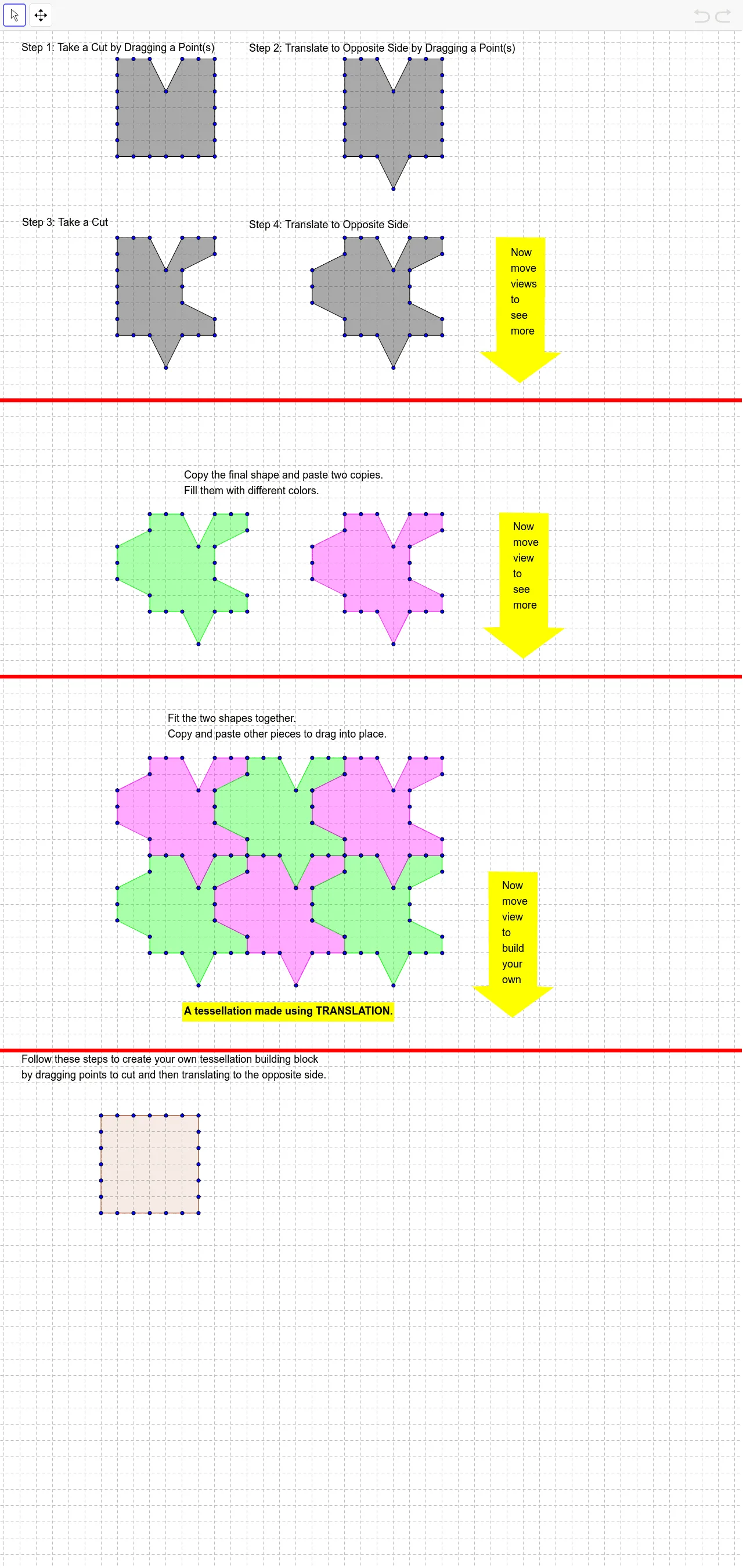
This GeoGebra example demonstrates how to create a seamless plane tessellation (tiling) by repeatedly translating a base polygon, such as a rhombus, across the canvas. The core mathematical concepts involve translation transformations, combinatorial arrangements, and periodic plane covering. The construction uses the Polygon command to define the initial shape and the Line command to set reference directions, then duplicates multiple polygon objects (labeled A through Z) via translation to fill the plane. This resource is ideal for middle or high school geometry classes, helping students visualize the properties of translations, the conditions for a shape to tessellate, and the combinatorial patterns that emerge. It also serves as a creative tool for generating artistic patterns and exploring symmetry in design.
GeoGebra Commands & Parameters
Polygon(A, B, K, L, M, N, O, P, Q, R, S, T, C, U, V, W, Z, D, E, F, G, H, I, J) → poly1, a, j, k, l, m, n, o, p, q, r, s, b, t, u, v, w, z, c, d, e, f, g, h, iPolygon(A_1, B_1, K_1, L_1, M_1, N_1, O_1, P_1, Q_1, R_1, S_1, T_1, C_1, U_1, V_1, W_1, Z_1, D_1, E_1, F_1, G_1, H_1, I_1, J_1) → poly1_1, a_1, j_1, k_1, l_1, m_1, n_1, o_1, p_1, q_1, r_1, s_1, b_1, t_1, u_1, v_1, w_1, z_1, c_1, d_1, e_1, f_1, g_1, h_1, i_1Polygon(A_2, B_2, K_2, L_2, M_2, N_2, O_2, P_2, Q_2, R_2, S_2, T_2, C_2, U_2, V_2, W_2, Z_2, D_2, E_2, F_2, G_2, H_2, I_2, J_2) → poly1_2, a_2, j_2, k_2, l_2, m_2, n_2, o_2, p_2, q_2, r_2, s_2, b_2, t_2, u_2, v_2, w_2, z_2, c_2, d_2, e_2, f_2, g_2, h_2, i_2Polygon(A_3, B_3, K_3, L_3, M_3, N_3, O_3, P_3, Q_3, R_3, S_3, T_3, C_3, U_3, V_3, W_3, Z_3, D_3, E_3, F_3, G_3, H_3, I_3, J_3) → poly1_3, a_3, j_3, k_3, l_3, m_3, n_3, o_3, p_3, q_3, r_3, s_3, b_3, t_3, u_3, v_3, w_3, z_3, c_3, d_3, e_3, f_3, g_3, h_3, i_3Polygon(A_4, B_4, K_4, L_4, M_4, N_4, O_4, P_4, Q_4, R_4, S_4, T_4, C_4, U_4, V_4, W_4, Z_4, D_4, E_4, F_4, G_4, H_4, I_4, J_4) → poly1_4, a_4, j_4, k_4, l_4, m_4, n_4, o_4, p_4, q_4, r_4, s_4, b_4, t_4, u_4, v_4, w_4, z_4, c_4, d_4, e_4, f_4, g_4, h_4, i_4Polygon(A_5, B_5, K_5, L_5, M_5, N_5, O_5, P_5, Q_5, R_5, S_5, T_5, C_5, U_5, V_5, W_5, Z_5, D_5, E_5, F_5, G_5, H_5, I_5, J_5) → poly1_5, a_5, j_5, k_5, l_5, m_5, n_5, o_5, p_5, q_5, r_5, s_5, b_5, t_5, u_5, v_5, w_5, z_5, c_5, d_5, e_5, f_5, g_5, h_5, i_5Polygon(A_6, B_6, C_6, D_6, E_6, F_6, G_6) → poly2, a_6, b_6, c_6, d_6, e_6, f_6, g_6Polygon(A_7, B_7, C_7, D_7, E_7, F_7, G_7) → poly2_1, a_7, b_7, c_7, d_7, e_7, f_7, g_7Polygon(A_8, B_8, K_6, L_6, M_6, N_6, O_6, P_6, Q_6, R_6, S_6, T_6, C_8, U_6, V_6, W_6, Z_6, D_8, E_8, F_8, G_8, H_6, I_6, J_6) → poly1_6, a_8, j_6, k_6, l_6, m_6, n_6, o_6, p_6, q_6, r_6, s_6, b_8, t_6, u_6, v_6, w_6, z_6, c_8, d_8, e_8, f_8, g_8, h_6, i_6Polygon(A_9, B_9, K_7, L_7, M_7, N_7, O_7, P_7, Q_7, R_7, S_7, T_7, C_9, U_7, V_7, W_7, Z_7, D_9, E_9, F_9, G_9, H_7, I_7, J_7) → poly1_7, a_9, j_7, k_7, l_7, m_7, n_7, o_7, p_7, q_7, r_7, s_7, b_9, t_7, u_7, v_7, w_7, z_7, c_9, d_9, e_9, f_9, g_9, h_7, i_7Polygon(A_{10}, B_{10}, K_8, L_8, M_8, N_8, O_8, P_8, Q_8, R_8, S_8, T_8, C_{10}, U_8, V_8, W_8, Z_8, D_{10}, E_{10}, F_{10}, G_{10}, H_8, I_8, J_8) → poly1_8, a_{10}, j_8, k_8, l_8, m_8, n_8, o_8, p_8, q_8, r_8, s_8, b_{10}, t_8, u_8, v_8, w_8, z_8, c_{10}, d_{10}, e_{10}, f_{10}, g_{10}, h_8, i_8Polygon(A_{11}, B_{11}, K_9, L_9, M_9, N_9, O_9, P_9, Q_9, R_9, S_9, T_9, C_{11}, U_9, V_9, W_9, Z_9, D_{11}, E_{11}, F_{11}, G_{11}, H_9, I_9, J_9) → poly1_9, a_{11}, j_9, k_9, l_9, m_9, n_9, o_9, p_9, q_9, r_9, s_9, b_{11}, t_9, u_9, v_9, w_9, z_9, c_{11}, d_{11}, e_{11}, f_{11}, g_{11}, h_9, i_9Polygon(A_{12}, B_{12}, K_{10}, L_{10}, M_{10}, N_{10}, O_{10}, P_{10}, Q_{10}, R_{10}, S_{10}, T_{10}, C_{12}, U_{10}, V_{10}, W_{10}, Z_{10}, D_{12}, E_{12}, F_{12}, G_{12}, H_{10}, I_{10}, J_{10}) → poly1_{10}, a_{12}, j_{10}, k_{10}, l_{10}, m_{10}, n_{10}, o_{10}, p_{10}, q_{10}, r_{10}, s_{10}, b_{12}, t_{10}, u_{10}, v_{10}, w_{10}, z_{10}, c_{12}, d_{12}, e_{12}, f_{12}, g_{12}, h_{10}, i_{10}Polygon(A_{13}, B_{13}, K_{11}, L_{11}, M_{11}, N_{11}, O_{11}, P_{11}, Q_{11}, R_{11}, S_{11}, T_{11}, C_{13}, U_{11}, V_{11}, W_{11}, Z_{11}, D_{13}, E_{13}, F_{13}, G_{13}, H_{11}, I_{11}, J_{11}) → poly1_{11}, a_{13}, j_{11}, k_{11}, l_{11}, m_{11}, n_{11}, o_{11}, p_{11}, q_{11}, r_{11}, s_{11}, b_{13}, t_{11}, u_{11}, v_{11}, w_{11}, z_{11}, c_{13}, d_{13}, e_{13}, f_{13}, g_{13}, h_{11}, i_{11}Line(H_{12}, I_{12}) → h_{12}Line(J_{12}, K_{12}) → i_{12}Line(L_{12}, M_{12}) → j_{12}Polygon(A_{14}, B_{14}, C_{14}, D_{14}, E_{14}, F_{14}, G_{14}) → poly2_2, a_{14}, b_{14}, c_{14}, d_{14}, e_{14}, f_{14}, g_{14}Polygon(N_{12}, O_{12}, Z_{12}, H_{13}, I_{13}, J_{13}, K_{13}, L_{13}, M_{13}, N_{13}, O_{13}, P_{13}, P_{12}, Q_{13}, R_{13}, S_{13}, T_{13}, Q_{12}, R_{12}, S_{12}, T_{12}, U_{12}, V_{12}, W_{12}) → poly3, n_{12}, w_{12}, z_{12}, h_{13}, i_{13}, j_{13}, k_{13}, l_{13}, m_{13}, n_{13}, o_{13}, o_{12}, p_{13}, q_{13}, r_{13}, s_{13}, t_{13}, p_{12}, q_{12}, r_{12}, s_{12}, t_{12}, u_{12}, v_{12}
AI Drawing Prompt Reference
Create a seamless plane tessellation by repeatedly translating a base polygon, such as a rhombus, across the canvas. Start by defining a rhombus, then translate it along two perpendicular directions, duplicating it each time to form a grid of rhombuses that cover the entire plane, demonstrating translation transformations, combinatorial arrangements, and periodic plane covering.
The prompt above was compiled from the original drawing commands and is for reference only.