
Tortellini Geometry Construction
Loading the math board and drawing, please wait…
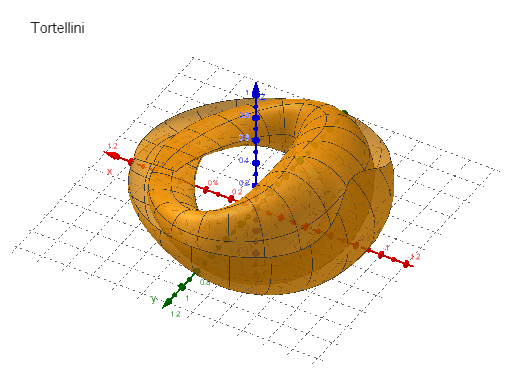
This example demonstrates the geometric shape of Tortellini. It involves the use of circles and polygons in coordinate geometry. By using the Surface command, the surface of Tortellini can be constructed. Suitable for high school students and math enthusiasts to learn geometric construction.
GeoGebra Commands & Parameters
Surface(((0.5^(1 + (0.5 * sin((k / 120 * π)))) * cos((((11 * k) - 60) / 600 * π))) * (1.35 + (((3 + sin((k / 120 * π))) * ((0.2 * sin((k / 120 * π))) + j / 400)) * cos(((j / 60 * (2.7 + (0.2 * sin((k / 120 * π))^(50)))) * π) + (1.4 * π))))), ((0.5 * sin((((11 * k) - 60) / 600 * π))) * (1.35 + (((0.6 + sin((k / 120 * π))) * ((0.2 * sin((k / 120 * π))) + j / 400)) * cos(((j / 60 * (2.7 + (0.2 * sin((k / 120 * π))^(50)))) * π) + (1.4 * π))))), 0.15 + k / 1200 + (((0.5 * ((0.8 * sin((k / 120 * π))) + j / 400)) * sin((k / 120 * π))) * sin(((j / 60 * (2.7 + (0.2 * sin((k / 120 * π))^(50)))) * π) + (1.4 * π))), k, 0, 120, j, 0, 60) → a
AI Drawing Prompt Reference
Draw a complex geometric shape composed of multiple circles and polygons in a coordinate system. Use the surface command to generate a shape similar to Tortellini, defined by a parametric equation involving complex combinations of sine and cosine functions, creating a wavy and spiral-like surface texture. The overall construction should illustrate the principles of coordinate geometry, suitable for educational purposes and demonstrating the process of geometric construction.
The prompt above was compiled from the original drawing commands and is for reference only.