
Toric Solids
Loading the math board and drawing, please wait…
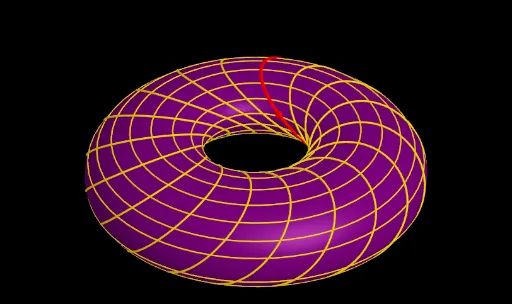
This example demonstrates the construction of toric solids, a special type of 3D shape involving circles, planes, and rotation. Using GeoGebra commands such as Circle, Sequence, and Zip, the generation process of these solids can be dynamically shown. Suitable for high school or university solid geometry courses.
GeoGebra Commands & Parameters
Circle(B, C, A) → cSequence(k, k, 1, n) → L_nZip(Rotate[c, ((k * 2) * π / (n + 1))], k, L_n) → listecerclesCenter(c) → MPlane(A, B, C) → pOrthogonalLine(M, p) → gLine(M, B) → fZip(Rotate[B, ((k * 2) * π / (n + 1)), g], k, L_n) → listpointsZip(Circle[zAxis, P], P, listpoints) → listcurvesCenter(c) → DSegment(D, B) → f_1Segment(D, E) → g_1Surface(c, (2 * π), zAxis) → aCircle(B, C, A) → dSequence(Intersect[p, Element[listcurves, i]], i, 1, Length[listcurves], 1) → l1
AI Drawing Prompt Reference
Draw a toric solid by first creating a circle c, then rotating it to generate a series of circles forming the surface of the toric solid. Next, draw a plane p through the center M of circle c, and create a perpendicular line g. Rotate points on circle c around g to generate a series of points, which serve as the centers for new circles, forming the side of the toric solid. Finally, connect the center D of the toric solid to the center B of circle c and to a point E on the circumference of circle c, creating two auxiliary line segments.
The prompt above was compiled from the original drawing commands and is for reference only.