
Top off a Pyramid: Dynamic Truncation with Percentages
Loading the math board and drawing, please wait…
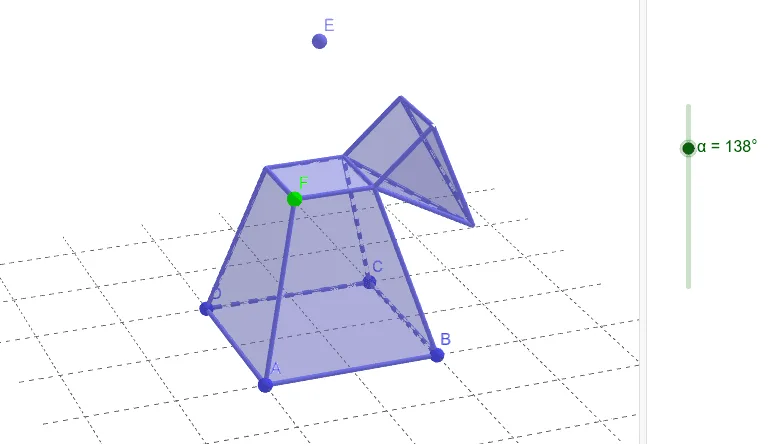
① This example demonstrates how to construct a pyramid in GeoGebra and dynamically truncate its top using a percentage parameter, creating a frustum (truncated pyramid) and visualizing how the solid changes with the ratio. ② Core mathematical concepts include solid geometry of pyramids and frustums, percentage-based scaling, linear equations for locating the cutting plane, and differential geometry ideas related to tangent planes (via orthogonal planes). ③ Construction highlights: Point defines vertices A-E, Pyramid builds the four-sided pyramid, OrthogonalPlane creates a plane perpendicular to a direction, Intersect finds intersection lines, Polygon forms the cross-section, and Rotate adjusts orientation; objects include faces (faceABCD, faceABE, etc.) and edges (edgeAB, edgeBC, etc.), with parameters q1-q4 controlling the truncation ratio. ④ Suitable for high school or early college students to explore dynamic cross-sections in solid geometry, the effect of percentages on spatial shapes, and as a visual aid for tangent plane concepts in calculus.
GeoGebra Commands & Parameters
Point(zAxis) → EPyramid(A, B, C, D, E) → a, faceABCD, edgeAE, edgeBE, edgeCE, edgeDE, faceABE, faceBCE, faceCDE, faceADE, edgeAB, edgeBC, edgeCD, edgeADPoint(edgeAE) → FOrthogonalPlane(F, zAxis) → bIntersect(edgeBE, b) → GIntersect(edgeCE, b) → HIntersect(edgeDE, b) → IPolygon(F, A, D, I) → q1, f, a_1, d, iPolygon(I, H, C, D) → q2, i_1, h, c, d_1Polygon(H, C, B, G) → q3, h_1, c_1, b_1, gPolygon(G, F, A, B) → q4, g_1, f_1, a_2, b_2Polygon(D, A, B, C) → q5, d_2, a_3, b_3, c_2Polygon(I, F, G, H) → q6, i_2, f_2, g_2, h_2Pyramid(I, F, G, H, E) → e, faceFGHI, edgeEI, edgeEF, edgeEG, edgeEH, faceEFI, faceEFG, faceEGH, faceEHI, edgeFI, edgeFG, edgeGH, edgeHIRotate(e, α, edgeGH) → e'
AI Drawing Prompt Reference
Draw a square pyramid and dynamically truncate its top using a percentage parameter to form a frustum. First, define five vertices A, B, C, D, and E, and build the pyramid. Then, take a point F on edge AE and create a plane b perpendicular to the Z-axis, which intersects BE, CE, and DE at points G, H, and I, respectively. Use these points to construct four new polygons to form the frustum's sides. Finally, rotate the frustum to observe its changes.
The prompt above was compiled from the original drawing commands and is for reference only.