
Tiling the Plane with Two Squares: Construction and Translation Pattern
Loading the math board and drawing, please wait…
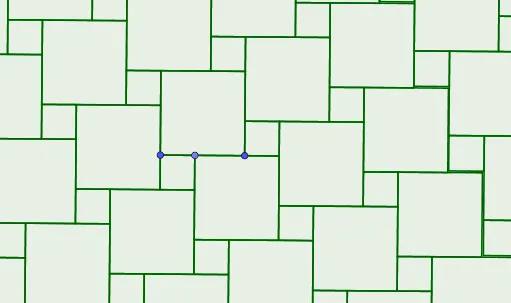
This example demonstrates how to tile the plane using two square tiles by designing local configurations and then repeating them through translation to obtain a seamless global covering. It focuses on geometric tiling (tessellation), translation symmetry/patterns, and the consistency conditions required for the squares to meet without gaps or overlaps. The construction also leverages right-triangle relationships and a structured organization using natural-number indexing to control how tile positions propagate. In GeoGebra, the model is built with the commands Point, Polygon, and Sequence: key vertices (A, B, C, D, E, F, G, etc.) define polygonal tile shapes (poly1, poly2), while Sequence-based objects (g, h, i, j, k, l, m, n, L_1) generate the repeated placements that extend the tiling across the plane. Suitable for advanced secondary students, geometry/construction instruction, and learners who want to connect visual construction with rigorous tiling logic.
GeoGebra Commands & Parameters
Point(Segment[B, (2 * A) - B]) → CPolygon(A, B, 4) → poly1, g, h, i, j, D, EPolygon(C, A, 4) → poly2, k, l, m, n, F, GSequence(Sequence[Translate[{poly1, poly2}, (k * (E - C)) + (l * (y(E) - y(C), x(C) - x(E)))], k, -10, 10], l, -10, 10) → L_1
AI Drawing Prompt Reference
Create a plane tiling using two square tiles. Start by drawing one square, then construct a second square sharing a side with the first, offset along the extension of that side. Use this pair of squares as a basic unit. Repeatedly translate this unit in two perpendicular directions—one horizontal and one vertical—by distances equal to the side length of the squares. This generates a seamless, periodic grid of squares covering the entire plane without gaps or overlaps.
The prompt above was compiled from the original drawing commands and is for reference only.