
Three Different Projections
Loading the math board and drawing, please wait…
In collections
My 3D Collection
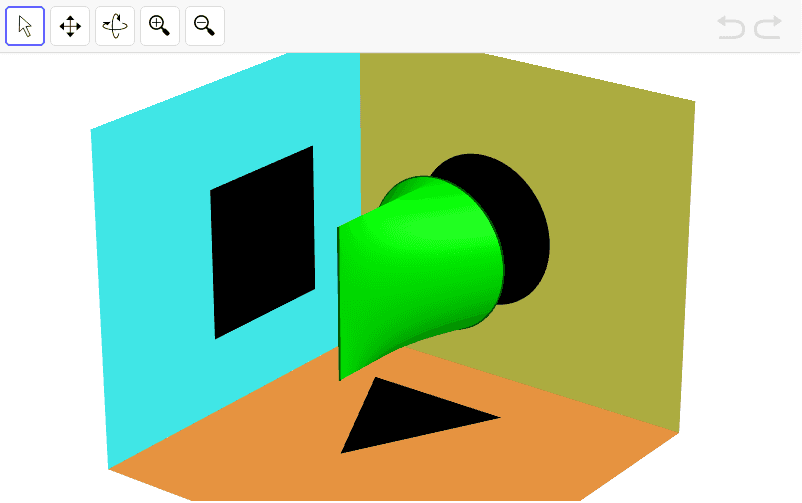
This example demonstrates three different projections of 3D geometric solids. It involves core math concepts like solid geometry, similar triangles, integers, LCM and GCD, fractions. Construction uses GeoGebra commands and objects such as Curve, Cartesian, Surface, Polygon, Circle. Suitable for high school students learning 3D geometry and projection transformations.
GeoGebra Commands & Parameters
CurveCartesian(2 + cos(t), -1, 2 + sin(t), t, -1.5707963267948966, 1.5707963267948966) → aCurveCartesian(2 - cos(t), -1, 2 + sin(t), t, -1.5708, 1.5708) → bCurveCartesian(2, -3, t, t, 1, 3) → cSurface((2 * u) + ((1 - u) * (2 + cos(t))), (-3 * u) + ((1 - u) * (-1)), ((2 / π * (t + π)) * u) + ((1 - u) * (2 + sin(t))), t, -1.5708, 1.5708, u, 0, 1) → dSurface((2 * u) + ((1 - u) * (2 - cos(t))), (-3 * u) + ((1 - u) * (-1)), ((2 / π * (t + π)) * u) + ((1 - u) * (2 + sin(t))), t, -1.5708, 1.5708, u, 0, 1) → ePolygon((1, -1, 0.01), (3, -1, 0.01), (2, -3, 0.01)) → poly1, i, j, kPolygon((0.01, -1, 1), (0.01, -3, 1), (0.01, -3, 3), (0.01, -1, 3)) → poly2, l, m, n, qCircle((3, -0.01, 2), (2, -0.01, 3), (1, -0.01, 2)) → pSurface(0, u, t, t, 0, 10, u, -5, 0) → fSurface(t, 0, u, t, 0, 5, u, 0, 10) → gSurface(t, u, 0, t, 0, 5, u, -5, 0) → h
AI Drawing Prompt Reference
Create a 3D projection diagram showing two curved half-cylinder surfaces extending from front to back, each formed by sweeping a semicircular arc along a straight line, converging at a triangular base plane. Include a vertical rectangular plane, a horizontal circle, and three mutually perpendicular coordinate planes (side, bottom, and front). Render all objects as semi-transparent or wireframe to illustrate geometric relationships under different projections.
The prompt above was compiled from the original drawing commands and is for reference only.