
Test for Triangle Similarity (SSS #2) via Dynamic Geometry
Loading the math board and drawing, please wait…
In collections
Tests for Similarity
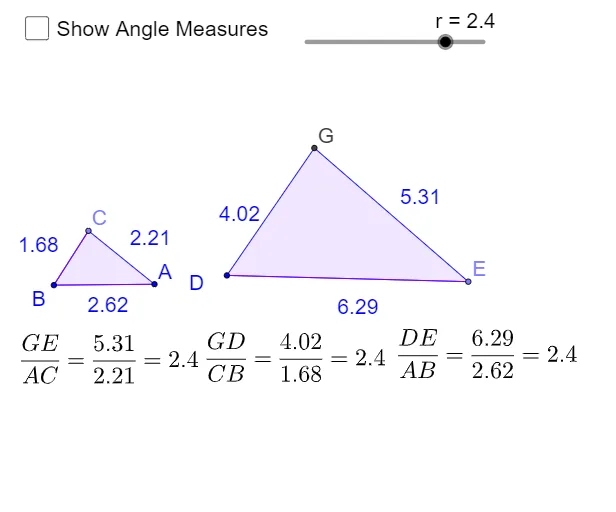
This GeoGebra applet lets students investigate the meaning of SSS (Side–Side–Side) similarity for triangles using a dynamic construction. It demonstrates how proportional corresponding sides determine triangle similarity and how this relationship manifests in the geometry of the second triangle. The core concepts are triangle similarity, the SSS similarity criterion, proportional relationships between corresponding sides, and the resulting correspondence of angles. Construction is built from commands such as Rotate and Angle (to set orientation and measure angle relationships), Point, Line, Segment, Polygon, and Circle (to construct the triangles and their defining elements), and Intersect (to compute key intersection points). Labeled text objects (e.g., text1–text3) support comparison, while polygon objects (poly1, poly2) represent the two triangles under investigation. Suitable for middle/high school geometry lessons and student self-study focused on similarity and dynamic-geometry reasoning.
GeoGebra Commands & Parameters
Rotate(A, α, B) → A'Angle(A, B, A') → βLine(A', B) → aLine(B, A) → bPoint(a) → CSegment(B, C) → dSegment(B, A) → ePolygon(C, B, A) → poly1, a_1, c_1, b_1Point(Circle[D, abs(q)]) → ESegment(D, E) → cRotate(E, α, D) → E'Angle(E, D, E') → γLine(D, E') → fPoint(Circle[D, abs(p)]) → FSegment(D, F) → gCircle(D, F) → hIntersect(h, f, 2) → GPolygon(G, D, E) → poly2, e_1, g_1, d_1Angle(B, C, A) → δAngle(D, G, E) → εAngle(G, E, D) → ζAngle(C, A, B) → η
AI Drawing Prompt Reference
Please draw two similar triangles based on the SSS similarity criterion. Include key points A, B, C, D, E, G, and line segments a, b, c, d, e, f, g, h. Angles δ, ε, ζ, η represent the corresponding angle relationships. The construction order: first rotate points A and E, then construct line segments and triangles, and finally obtain the second triangle through intersection.
The prompt above was compiled from the original drawing commands and is for reference only.