
Tessellation by Translation: Constructing Plane Tilings with Vectors
Loading the math board and drawing, please wait…
In collections
Congruence (CO) Cluster
Congruence (Vol 1)
Congruence (Vol 1) Over 80 Resources
CCSS High School: Geometry (Congruence) Volume 1 S N ATTAR
Geometry (Congruence) Volume 1
CCSS High School: Geometry (Congruence) Volume 1
CCSS High School: Geometry (Congruence) Volume 1
CCSS High School: Geometry (Congruence) Volume 1
CCSS High School: Geometry (Congruence) Volume 1
CCSS High School: Geometry (Congruence) Volume 1
CCSS High School: Geometry (Congruence) Volume 1
CCSS High School: Geometry (Congruence) Volume 1
CCSS High School: Geometry (Congruence) Volume 1
CCSS High School: Geometry (Congruence) Volume 1
CCSS High School: Geometry (Congruence) Volume 1
CCSS High School: Geometry (Congruence) Volume 1
Unit 7: Polygons and Quadrilaterals
CCSS High School: Geometry (Congruence) Volume 1
Transformations
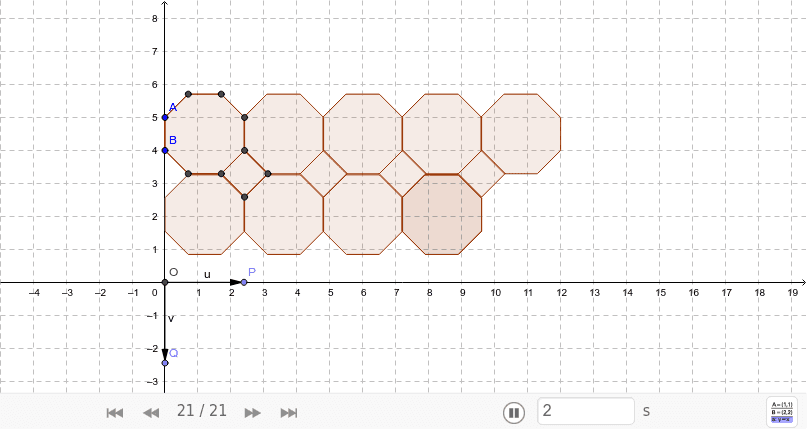
This example demonstrates how to construct a plane tessellation (tiling) using translation transformations, where a base polygon is repeatedly shifted along multiple directions to seamlessly cover the entire plane. The core mathematical concepts involve geometric transformations, specifically translation, and the use of vectors to define shift directions and magnitudes. It also incorporates polygon construction and combination. The construction steps include: creating a base polygon (poly1) with the Polygon command, defining translation vectors (such as u and v), using the Translate command to generate translated copies (poly1', poly1'', etc.), determining intersection points and key vertices with Intersect and Point commands, and finally assembling multiple polygons (poly2, poly3, etc.) into a complete tiling pattern. This example is suitable for middle or high school geometry classes or enrichment activities, helping students intuitively understand the properties of translations, the role of vectors in geometric construction, and the fundamentals of plane tessellation. It can also be used for pattern design in art or mathematics projects.
GeoGebra Commands & Parameters
Polygon(A, B, 8) → poly1, a, D, E, F, G, H, b, c, d, e, f, g, h, CIntersect(xAxis, yAxis) → OPoint(xAxis) → PPoint(yAxis) → QVector(O, P) → uVector(O, Q) → vTranslate(poly1, u) → poly1'Translate(poly1', u) → poly1''Translate(poly1'', u) → poly1'''Translate(poly1''', u) → poly2Translate(poly1, v) → poly1'_1Translate(poly1', v) → poly1''_1Translate(poly1'', v) → poly1'''_1Translate(poly1''', v) → poly3Translate(poly1''', v) → poly4Polygon(E, D, 4) → poly5, i, j, k, l, I, JTranslate(poly5, u) → poly5'Translate(poly5', u) → poly5''Translate(poly5'', u) → poly5'''
AI Drawing Prompt Reference
Create a plane tiling pattern using multiple regular octagons. Start by constructing a regular octagon as the base shape. Then, define two perpendicular vectors u and v. Next, translate the base shape along vectors u and v to generate multiple translated copies. Finally, assemble these copies through translation and combination to form a seamless tiling pattern covering the entire plane.
The prompt above was compiled from the original drawing commands and is for reference only.