
Tangram Challenges: Rotational Geometric Probability Practice
Loading the math board and drawing, please wait…
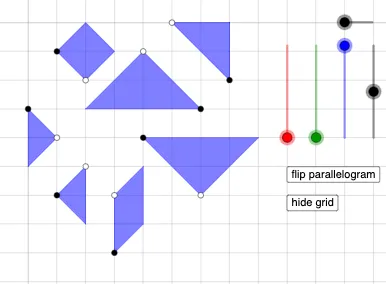
This example demonstrates how tangram-style partitioning and rotational construction can generate multiple valid triangle/polygon configurations for “challenge” exploration, linking the geometry to an intuitive probability viewpoint. It centers on geometric construction concepts (constructing key vertices from circles, lines, perpendiculars, and intersections), shape relationships among triangles and parallelogram-like polygon pieces, and the correspondence induced by rotation transformations. It also supports probability thinking—especially the idea of modeling outcomes and interpreting quantities like expected values from repeated choices or trials. Construction highlights in GeoGebra: Circle to define circular constraints; Point and Line/Segment to place and connect control vertices and edges; OrthogonalLine to create perpendicular alignment; Intersect to compute intersection points that become tangram vertices; Polygon to assemble composite regions; Rotate to spin pieces into new configurations; Ray for directed geometric references; and If to handle conditional logic for selecting/labeling configurations. The example’s many named point and polygon objects track different stages of the construction. Suitable for middle school to early university learners, and useful for lessons on geometric constructions, transformation-based reasoning, tangram/puzzle math, and probability intuition.
GeoGebra Commands & Parameters
Circle(A, a) → cPoint(c) → BLine(A, B) → fOrthogonalLine(B, f) → g_{4}Circle(B, A) → dIntersect(d, g_{4}, 2) → CPolygon(A, B, C) → t1, c_1, a_1, b_{3}Circle(D, a) → ePoint(e) → ELine(D, E) → hOrthogonalLine(E, h) → iCircle(E, D) → kIntersect(k, i, 2) → FPolygon(D, E, F) → t2, f_1, d_1, e_1Circle(G, a / 2) → pPoint(p) → HLine(G, H) → jOrthogonalLine(H, j) → lCircle(H, G) → qIntersect(q, l, 2) → IOrthogonalLine(G, j) → mOrthogonalLine(I, m) → nIntersect(m, n) → JPolygon(G, H, I, J) → q1, g_1, h_1, i_1, j_1Circle(N, a / 2) → p_1Point(p_1) → OLine(N, O) → n_1OrthogonalLine(O, n_1) → q_1Circle(O, N) → r_1Intersect(r_1, q_1, 1) → PPolygon(O, N, P) → t4, p_2, o_1, n_2Circle(Q, (sqrt(2) / 2 * a)) → s_1Point(s_1) → RLine(Q, R) → t_1Rotate(R, ((-π)) / 4, Q) → R'Rotate(R, π / 4, Q) → R'_{1}Ray(Q, R') → b_1Circle(Q, a / 2) → d_2Intersect(d_2, b_1, 1) → SLine(S, t_1) → f_2Circle(S, (sqrt(2) / 2 * a)) → c_2Intersect(c_2, f_2, 2) → TPolygon(Q, S, T, R) → q2, q_2, s_2, t_2, r_2Ray(Q, R'_{1}) → g_2Intersect(d_2, g_2, 1) → ULine(U, t_1) → h_2Circle(U, (sqrt(2) / 2 * a)) → e_2Intersect(e_2, h_2, 2) → VPolygon(Q, R, V, U) → q3, q_3, r_3, v, uPoint(Circle[W, a / 2]) → ZSegment(W, Z) → i_2Rotate(Z, ((-π)) / 2, W) → Z'Polygon(Z, W, Z') → t5, z', z_1, wPoint(Circle[A_1, a]) → B_1Segment(A_1, B_1) → j_2Rotate(B_1, ((-π)) / 4, A_1) → C_1Rotate(A_1, π / 4, B_1) → D_1Ray(B_1, D_1) → m_2Ray(A_1, C_1) → a_2Intersect(m_2, a_2) → E_1Polygon(B_1, A_1, E_1) → t6, b_2, f_3, g_3If(o ≟ 1, (sqrt(2) / 32 * a), o ≟ 2, a / 32) → r_{4}
AI Drawing Prompt Reference
Draw a geometric construction in the plane using a fixed reference point and a scale parameter a. Start by drawing a circle centered at A with radius a, then place a point B on that circle. Construct the line through A and B, and draw the perpendicular line through B to that line. Create additional circles centered at A and at B, and use their intersections with the perpendicular line to determine points A, B, and C, forming a first triangular polygon. Next, repeat the same style of steps using centers D and E: draw a circle pattern, construct a perpendicular through the corresponding point, find the intersection points to obtain triangle D-E-F, and assemble these pieces into a composite polygon. Then use circles with radius a/2 to locate new points, combine perpendiculars, lines, and intersections to build a quadrilateral region Q-S-T-R. Finally, rotate the point R around Q by ±π/4 to get rotated positions, draw rays from Q through the rotated point(s), intersect these with the relevant circles/lines to define the remaining vertices, and assemble the final polygonal partition.
The prompt above was compiled from the original drawing commands and is for reference only.