
Tangents to Circles (Open Middle)
Loading the math board and drawing, please wait…
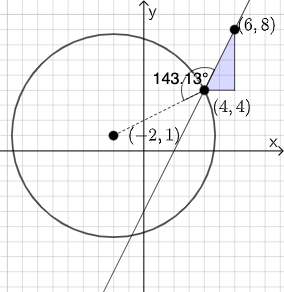
This example demonstrates constructing tangents to circles and related geometric elements using GeoGebra. It involves core math concepts like circles, tangent lines, angles, slopes, and coordinate geometry. Key GeoGebra commands and objects used include PointIn, Line, Polygon, Segment, Slope, Textfield, Mode, If, Circle, Angle. Suitable for high school students exploring geometric constructions and properties.
GeoGebra Commands & Parameters
PointIn(e) → DPointIn(e) → BPointIn(e) → ALine(A, B) → fPolygon(A, C, B) → t1, b_1, a_1, c_1Segment(B, C) → gSegment(C, A) → hSlope(f) → iTextfield(k) → InputBox2Textfield(j) → InputBox1Mode(l1) → l2If(Length[l2] ≟ 0, "You have no repeated digits!", "You have repeated digits.") → text5If(j / k ≟ i, "This value is correct!", "Sorry. This is not correct.") → text4Circle(D, A) → pSegment(D, A) → qAngle(B, A, D) → αIf(α ≟ pi / 2, "Line is tangent to circle.", "Line is not tangent to circle.") → text1
AI Drawing Prompt Reference
Place three points A, B, and D in the plane, then draw the line through A and B. Use the triangle connections involving A, B, and a third point C by drawing the segments that connect B–C and C–A, forming the polygonal triangle. Construct a circle centered at D passing through A, and also draw the segment from D to A. Mark the angle α at A between the rays AB and AD. Associate a slope measure with the line through A and B and provide two input boxes to compare values. Finally, check whether the marked angle α is a right angle to decide whether the line is tangent to the circle, and show the corresponding “tangent/not tangent” message, along with a correctness message based on the entered ratio versus the line’s slope.
The prompt above was compiled from the original drawing commands and is for reference only.