
Tangents to Circles: Geometric Construction
Loading the math board and drawing, please wait…
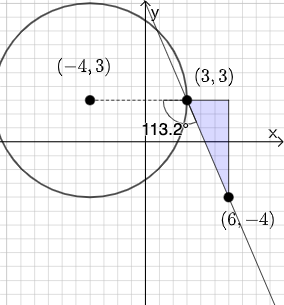
This example demonstrates how to draw tangents to a circle using GeoGebra, highlighting the geometric relationship between tangents and circles. Key mathematical concepts include tangent properties, coordinate geometry, and slope calculations. Construction involves using commands like PointIn, Line, and Circle, along with Slope and Angle for verification. Suitable for middle or high school geometry learning to understand tangent properties and coordinate geometry applications.
GeoGebra Commands & Parameters
PointIn(e) → APointIn(e) → BPointIn(e) → DLine(A, B) → fPolygon(A, C, B) → t1, b_1, a_1, c_1Segment(B, C) → gSegment(C, A) → hSlope(f) → iTextfield(k) → InputBox2Textfield(j) → InputBox1Mode(l1) → l2If(Length[l2] ≟ 0, "You have no repeated digits!", "You have repeated digits.") → text5Circle(D, A) → pSegment(D, A) → qAngle(B, A, D) → αIf(α ≟ pi / 2, "Line is tangent to circle.", "Line is not tangent to circle.") → text1Textfield(s) → InputBox3Textfield(t) → InputBox4If(j / k ≟ i, "√", "X") → text6If(Slope[q] ≟ s / t, "√", "X") → text7
AI Drawing Prompt Reference
Draw a circle and two tangents. First, select two points A and B on the circle, then draw a line f through these points. Construct a triangle ABD with D as another point on the circle. Calculate the slope i of line f and input the slope value. If the slope of line f equals the input value, then line f is tangent to the circle; otherwise, it is not. Finally, calculate the angle BAD, if angle BAD equals 90 degrees, then line f is tangent to the circle.
The prompt above was compiled from the original drawing commands and is for reference only.