
Tangent of a Difference: Trig Identity Puzzle + Proof
Loading the math board and drawing, please wait…
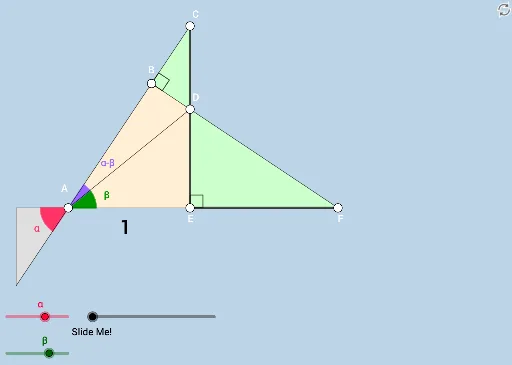
This example demonstrates the tangent of a difference of two angles trigonometric identity through an interactive puzzle and logical reasoning exercise. Core math concepts include trigonometric functions, identity proof, and geometric construction. It utilizes GeoGebra commands and objects such as Rotate, Angle, Ray, Intersect, Line, Circle, Segment, Min, CircleSector, Distance, Polygon, Dilate, Vector, and Translate. Suitable for high school mathematics education to help students understand and master trigonometric identities.
GeoGebra Commands & Parameters
Rotate(E, (a * π / 180), A) → B'Angle(E, A, B') → αRay(A, B') → gRotate(E, (b * π / 180), A) → B'_1Angle(E, A, B'_1) → βRay(A, B'_1) → hIntersect(f, h) → DIntersect(g, f) → CLine(D, A) → iLine(C, A) → jCircle(A, 1) → cIntersect(c, j, 2) → F_1Ray(A, F_1) → lRay(A, (-1, 0)) → mAngle(G, A, F_1) → γRotate(E, α, D) → B'_2Angle(E, D, B'_2) → δRay(D, B'_2) → kIntersect(n, k) → FRotate(D, π, D) → C'Rotate(B'_2, π, D) → HRay(C', H) → k'Intersect(g, k') → BSegment(B, D) → pSegment(D, E) → qSegment(E, F) → rMin({p, q, r}) → dCircle(A, (0.6 * d)) → eCircle(D, (0.6 * d)) → sIntersect(e, l) → J,Intersect(n, m) → KIntersect(e, n) → L, MIntersect(e, h) → N,Intersect(e, g) → O,CircleSector(A, L, J) → tCircleSector(A, M, N) → c_1CircleSector(A, N, O) → d_1Distance(A, E) → distanceABAngle(D, B, C) → ζPolygon(B, D, C) → t1, d_2, i_1, c_2Polygon(D, E, F) → t2, e_1, c_3, b_1Polygon(A, E, D, B) → q1, a_1, b_2, c_4, i_2Intersect(f_1, n) → PIntersect(f_1, l) → QPolygon(A, P, Q) → t3, q_1, a_2, p_1Segment(P, Q) → g_1Segment(A, P) → h_1Segment(A, Q) → j_1Segment(B, F) → k_1Segment(A, C) → l_1Segment(E, F) → n_1Segment(A, E) → r_1Rotate(t, If[0 < o ≤ 1, (o * π / 2), π / 2], A) → t'Dilate(A, If[1 < o ≤ 2, 2 - o, 0], D) → A'Vector(A, A') → uTranslate(t', u) → t''Angle(F, E, C) → εSegment(A, D) → s_1Dilate(E, If[2 < o ≤ 3, 3 - o, 0], F) → B'_3Vector(E, B'_3) → vTranslate(C, v) → D'Translate(E, v) → B'_4Segment(D', B'_4) → t_1Angle(R, F, D') → ηSegment(C, D) → m_1Segment(D, E) → f_2Ray(F, R) → g_2
AI Drawing Prompt Reference
Draw two rays representing the terminal sides of angles a and b, intersecting at the origin. Draw a unit circle centered at the origin, intersecting the rays at points. Connect each point to the origin to form triangles. Then draw another circle centered at the origin, intersecting the rays at new points. Connect each new point to the origin to form additional triangles. Finally, draw a circle intersecting the rays at further points and connect each to the origin.
The prompt above was compiled from the original drawing commands and is for reference only.