
Tangent Circles Family: Dynamic Construction in GeoGebra
Loading the math board and drawing, please wait…
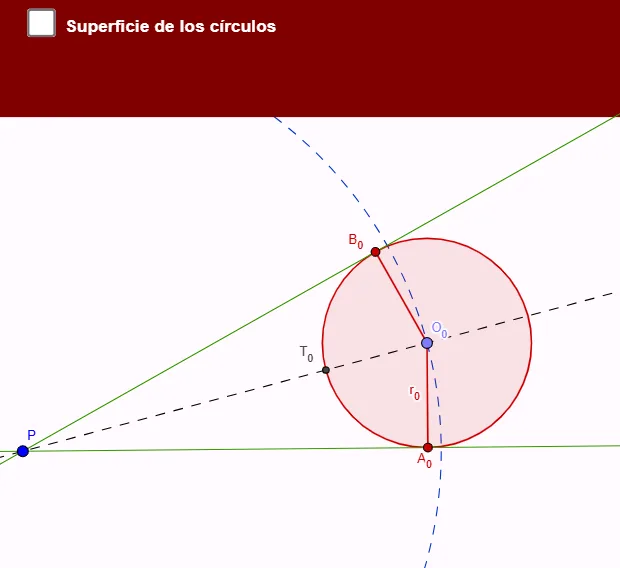
This example demonstrates how to construct a family of mutually tangent circles using GeoGebra and explore their geometric properties. The core mathematical concepts include tangents to circles, points of tangency, relative positions of circles and lines, and generating tangent circle families via homothety (dilation). Construction highlights: from the construction summary, commands such as Circle, Point, Tangent, Line, Intersect, Segment, Polygon, Dilate, and Angle are used, involving objects like multiple circles (c, r_0, r_1, r_2), tangent points (T_0, T_1), centers (O_0, O_1, O_2), auxiliary lines, and text labels. The Dilate command generates circles of different radii that are tangent to each other, and the Angle tool marks relevant angles. Suitable for high school or early college students learning geometric construction, tangent properties, and dynamic geometry software, as well as for classroom demonstrations by teachers.
GeoGebra Commands & Parameters
Circle(P, 12) → cPoint(c) → O_0Circle(O_0, 3) → dTangent(P, d) → f, gLine(P, O_0) → hIntersect(d, g) → B_0Intersect(d, f) → A_0Intersect(d, h) → T_0, CSegment(O_0, A_0) → r_0Segment(B_0, O_0) → iCircle(T_0, 9 / 5) → eIntersect(e, h) → O_1, BCircle(O_1, T_0) → kIntersect(k, f) → D, A_1Intersect(k, g, 1) → B_1Segment(O_1, A_1) → r_1Segment(O_1, B_1) → lIntersect(k, h) → A, T_1Circle(T_1, 27 / 25) → pIntersect(p, h) → O_2, FCircle(O_2, T_1) → qIntersect(q, g) → E, B_2Intersect(q, f) → H, A_2Segment(B_2, O_2) → jSegment(A_2, O_2) → r_2Polygon(A_2, T_1, A_1) → polígono1, a_1, a_2, t_1Polygon(A_1, T_0, A_0) → polígono2, a_0, a_3, t_0Dilate(A_2, enl, P) → KDilate(T_1, enl, P) → LDilate(A_1, enl, P) → MPolygon(K, L, M) → polígono1', m_1, k_1, l_1Angle(A_1, T_0, A_0) → αAngle(K, L, M) → βAngle(A_2, T_1, A_1) → γ
AI Drawing Prompt Reference
Draw a dynamic construction of mutually tangent circles to illustrate how a family of circles can be generated using homothety. Start with a large circle, draw a smaller circle inside it, find their points of tangency, and create a larger circle centered at one of these points. Repeat this process to generate multiple circles. Highlight all circle centers, tangency points, and auxiliary lines, and show segments connecting centers and tangents. Also, display triangles formed by three consecutive tangency points. Finally, apply homothety to these triangles to create a dynamic family of similar triangles.
The prompt above was compiled from the original drawing commands and is for reference only.