
Tangent at a General Point of Intersection of a Torus
Loading the math board and drawing, please wait…
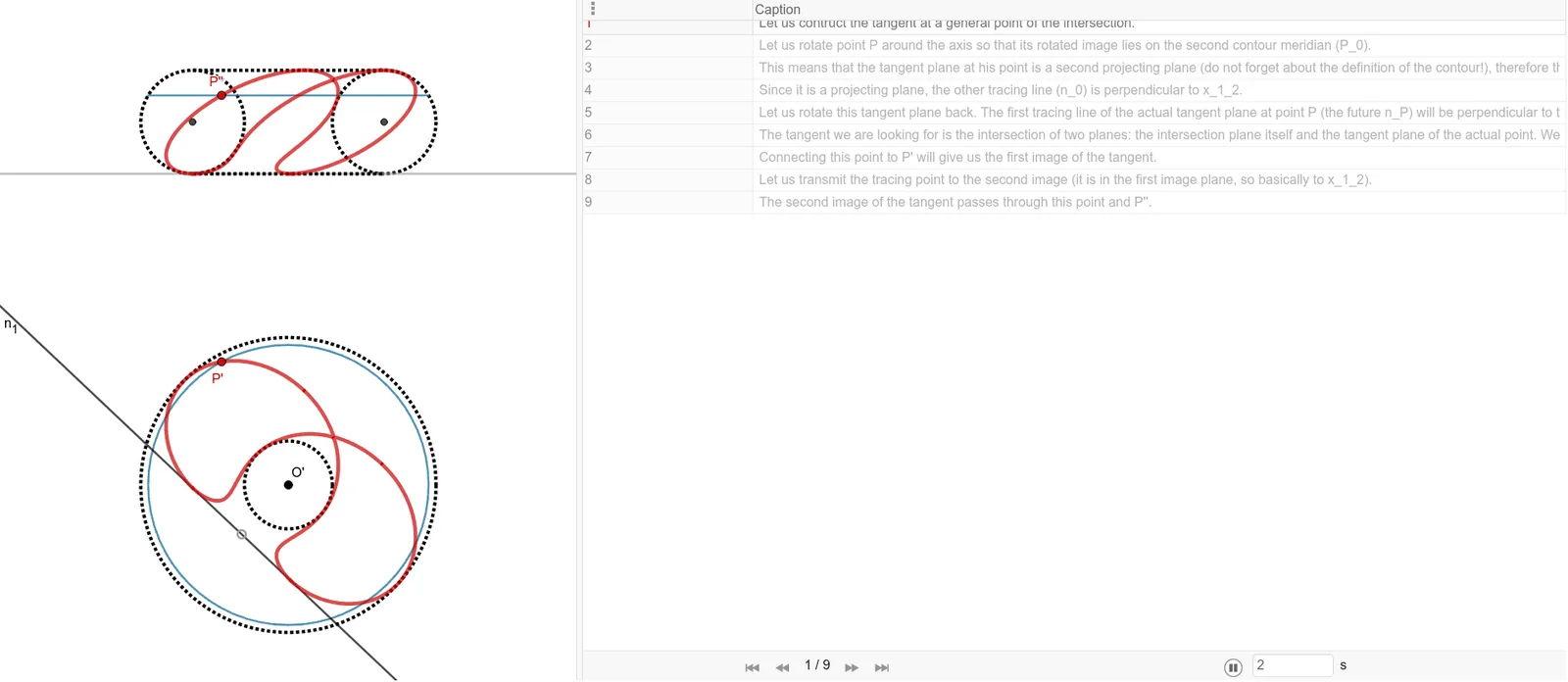
This example demonstrates the geometric construction of a tangent line at a general intersection point on a torus. It involves core concepts of solid geometry, including the torus surface, tangent planes, and local linearization at intersection points. The construction uses GeoGebra commands such as Line, Point, Circle, OrthogonalLine, Midpoint, Intersect, Mirror, Segment, Center, Locus, CircleArc, and Angle, along with objects like O', A, f, B, c, etc. Through operations like intersecting, drawing perpendiculars, finding midpoints, and reflecting, the tangent direction at the intersection point is determined. This is suitable for high school or undergraduate courses in solid geometry and analytic geometry, helping students understand tangent construction on curved surfaces and gain proficiency in interactive 3D GeoGebra tools.
GeoGebra Commands & Parameters
Line(O', A) → fPoint(f) → BCircle(O', B) → cPoint(f) → CCircle(O', C) → dOrthogonalLine(O', f) → gMidpoint(B, C) → DOrthogonalLine(D, f) → hPoint(g) → EOrthogonalLine(E, g) → iIntersect(h, i) → FCircle(F, Segment[D, C]) → eMirror(e, g) → e'Mirror(h, g) → h'Intersect(e', h', 2) → GIntersect(e, h, 2) → HSegment(G, H) → jIntersect(e', h', 1) → IIntersect(e, h, 1) → JSegment(I, J) → kLine(O', K) → lOrthogonalLine(K, l) → n_1Line(I, J) → n_2Line(G, H) → pPoint(l) → LOrthogonalLine(L, l) → qOrthogonalLine(K, f) → rOrthogonalLine(L, f) → sIntersect(r, n_2) → MIntersect(s, p) → NSegment(M, N) → tPoint(t) → P_2OrthogonalLine(P_2, g) → aIntersect(e', a) → Q, P_0''pIntersect(e, a) → S, TIntersect(a, g) → UCircle(O', Segment[U, Q]) → c_1Circle(O', Segment[U, P_0''p]) → d_1OrthogonalLine(P_2, i) → bIntersect(l, b) → VOrthogonalLine(V, l) → f_1Center(e') → I_1Intersect(d_1, f_1) → P', ZIntersect(c_1, f_1) → A_1, B_1Locus(P', P_2) → ponthalmaz1Locus(A_1, P_2) → ponthalmaz2Locus(B_1, P_2) → ponthalmaz3Locus(Z, P_2) → ponthalmaz4OrthogonalLine(Z, f) → g_1OrthogonalLine(B_1, f) → h_1OrthogonalLine(A_1, f) → i_1OrthogonalLine(P', f) → j_1Intersect(g_1, a) → C_1Intersect(h_1, a) → D_1Segment(P_0''p, S) → k_2Intersect(i_1, a) → E_1Intersect(j_1, a) → P''Locus(P'', P_2) → ponthalmaz5Locus(E_1, P_2) → ponthalmaz6Locus(D_1, P_2) → ponthalmaz7Locus(C_1, P_2) → ponthalmaz8Intersect(d_1, f) → P_0', H_1Segment(O', P_0') → mSegment(P', O') → nSegment(P_0''p, P_0') → p_1Intersect(e', k_2, 1) → P_0''Segment(I_1, P_0''p) → k_1OrthogonalLine(P_0''p, k_1) → l_1Intersect(n_2, l_1) → J_1Segment(P_0''p, J_1) → m_1OrthogonalLine(J_1, f) → n_3Intersect(f, n_3) → K_1Segment(O', K_1) → l_2Segment(J_1, K_1) → n_0Line(O', P') → q_1Circle(O', K_1) → e_1Intersect(e_1, q_1) → L_1, M_1CircleArc(O', M_1, K_1) → r_1Segment(P', M_1) → t_1OrthogonalLine(M_1, q_1) → s_1Intersect(n_1, s_1) → N_1Angle(N_1, M_1, O') → αSegment(M_1, N_1) → n_PLine(N_1, P') → a_1Mirror(N_1, P') → O_1Segment(O_1, N_1) → t_P'OrthogonalLine(N_1, n_2) → f_2Intersect(n_2, f_2) → P_1Segment(N_1, P_1) → g_2Line(P_1, P'') → h_2Mirror(P_1, P'') → Q_1Segment(Q_1, P_1) → t_P''Segment(O', M_1) → j_2
AI Drawing Prompt Reference
Draw a 3D torus with a central axis line. Pick two distinct points on this line and create circles centered at the torus center passing through each point. Construct a perpendicular line through the center to the axis. Use midpoints and reflections to build auxiliary circles intersecting the torus surface. Determine a tangent direction at a general intersection point on the torus. Then create a segment along this tangent and slide it along the torus, generating multiple locus curves that trace how the tangent point moves as the segment shifts.
The prompt above was compiled from the original drawing commands and is for reference only.