
Cone 45-22: Rotational Sections and Geometric Construction
Loading the math board and drawing, please wait…
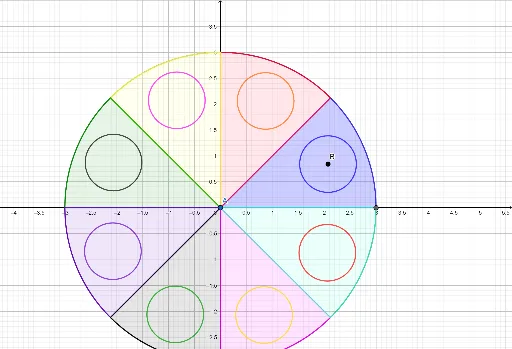
This example demonstrates the geometric construction of a cone (labeled 'cone 45-22') using rotation, intersection, and circular sector operations. It visualizes the cone's surface, base circle, and various cross-sections formed by intersecting lines and circles. Core mathematical concepts include solid geometry of cones, rotational solids, cross-sections (circles and sectors), and point-line-circle intersections. The construction uses GeoGebra commands such as Intersect, Point, Circle, Line, Rotate, and CircleSector, creating numerous objects (A, B, C, D, f, g, h, etc.) that define the cone's generatrices, base, axis, and sectional arcs. This is suitable for high school or early college students learning solid geometry, rotational bodies, and geometric construction, and serves as a teaching tool for demonstrating cone generation and section variations.
GeoGebra Commands & Parameters
Intersect(xAxis, yAxis) → APoint(xAxis) → B_1Circle(A, B_1) → cPoint(xAxis) → CPoint(xAxis) → DLine(C, D) → fPoint(yAxis) → EPoint(yAxis) → FLine(E, F) → gRotate(f, 45°, (0, 0)) → f'Rotate(g, 45°, (0, 0)) → g'Intersect(c, f, 2) → GIntersect(c, f', 2) → HCircleSector(A, G, H) → dIntersect(c, g, 2) → ICircleSector(A, (2.1213203435596424, 2.121320343559642), I) → eIntersect(c, g', 2) → JCircleSector(A, (0, 3), J) → hIntersect(c, f, 1) → KCircleSector(A, (-2.1213203435596424, 2.121320343559643), K) → kIntersect(c, f', 1) → LCircleSector(A, (-3, 0), L) → pIntersect(c, g, 1) → MCircleSector(A, L, M) → qIntersect(c, g', 1) → NCircleSector(A, M, N) → rCircleSector(A, (2.1213203435596424, -2.121320343559643), G) → sCircle(B, O) → tRotate(t, 45°, A) → t'Rotate(t, 90°, A) → t'_1Rotate(t, 135°, A) → t'_2Rotate(t, 180°, A) → t'_3Rotate(t, 225°, A) → t'_4Rotate(t, 270°, A) → t'_5Rotate(t, 315°, A) → t'_6