
Conics Generated Inside a Cone
Loading the math board and drawing, please wait…
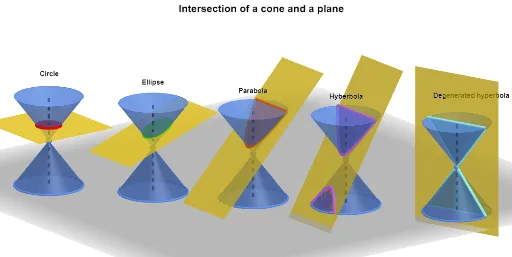
This example demonstrates how different cutting planes intersect a single cone to produce conic sections (e.g., ellipse/parabola/hyperbola) and visualizes the geometric relationships and symmetries behind the construction. The key mathematical ideas include the cone-and-plane definition of conics, intersection geometry between a cone surface and a plane, and the use of symmetry via mirror transformations to link corresponding elements. Construction highlights in GeoGebra: use Cone to build the 3D solid and Plane to define the cutting plane; apply Mirror to create symmetric counterparts; employ IntersectPath (and the associated intersection objects) to obtain the curve lying on the cone from the plane cut; use auxiliary primitives such as Circle, Line, Point, Segment, and Polygon to set up reference geometry and boundary conditions. The listed objects (e.g., key points/parameters and sets used to assemble the curve like m_1, A, F/F', R, and auxiliary constructions such as G/H/I, poly1) organize the curve from computed intersection results. Suitable for secondary to early university teaching and for hands-on geometric construction practice of conic sections.
GeoGebra Commands & Parameters
Mirror(F, A) → F'Circle(F, R, zAxis) → cCone(c, (-h)) → a, d, bMirror(a, A) → a'Segment(F, F') → fPolygon(H, I, 4, xOyPlane) → poly1, g, i, j, k, J, KPlane(I, H, G) → pIntersectPath(p, a) → eIntersectPath(p, a') → qMirror(A, zAxis) → A'Line(A, A') → lPoint(l) → BPoint(l) → CPoint(l) → DPoint(l) → EMirror(L, B) → L'Mirror(M, C) → M'Mirror(N, D) → N'Mirror(O, E) → O'Circle(L, R, zAxis) → rCircle(M, R, zAxis) → sCircle(N, R, zAxis) → tCircle(O, R, zAxis) → c_1Cone(r, (-h)) → m, d_1, nCone(s, (-h)) → o, e_1, uCone(t, (-h)) → v, f_1, wCone(c_1, (-h)) → a_1, g_1, b_1Mirror(L, B) → L'_{1}Mirror(M, C) → M'_{1}Segment(L, L'_{1}) → i_1Segment(M, M'_{1}) → j_1Segment(N, N') → k_1Segment(O, O') → l_1Mirror(m, B) → m'Mirror(o, C) → o'Mirror(v, D) → v'Mirror(a_1, E) → h_1Plane(Q, S, P) → p_1Mirror(S, P) → S'Mirror(Q, P) → Q'IntersectPath(p_1, m) → q_1IntersectPath(p_1, m') → r_1Polygon(Q', S', Q, S) → q1, q', s', q_2, s_1Mirror(U, T) → U'Mirror(V, T) → V'Plane(U, V, V') → p_2IntersectPath(p_2, o') → t_1IntersectPath(p_2, o) → c_2Polygon(V, U, V', U') → q2, v_1, u_1, n_1, u'Mirror(Z, W) → Z'Mirror(A_1, W) → B_1Plane(Z, A_1, W) → r_2IntersectPath(r_2, v') → d_2IntersectPath(r_2, v) → e_2Polygon(A_1, Z, B_1, Z') → q3, f_2, z_1, g_2, z'Mirror(D_1, l_1) → F_1Plane(D_1, F_1, C_1) → p_3IntersectPath(p_3, h_1) → h_2IntersectPath(p_3, b_1) → k_2Mirror(D_1, C_1) → G_1Mirror(F_1, C_1) → H_1Polygon(F_1, D_1, H_1, G_1) → q4, i_2, j_2, l_2, m_2
AI Drawing Prompt Reference
Create a 3D scene with a circular base and use it to generate a cone. Establish symmetry by mirroring key circular and cone elements across a vertical axis, producing corresponding reflected counterparts. Then define an oblique cutting plane using three points and slice the cone with this plane, obtaining the conic intersection curve(s) on the cone surface. Repeat the intersection for the mirrored cone setup and mirror-related plane configuration so the resulting curves and supporting reference segments/lines appear pairwise symmetric. Add appropriate circles, lines, and points to mark the geometric relations and the symmetry between the two conic sections.
The prompt above was compiled from the original drawing commands and is for reference only.