
Cone and Coordinate Geometry
Loading the math board and drawing, please wait…
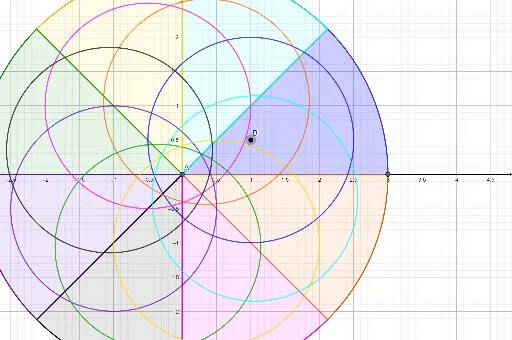
This example demonstrates how to construct a cone using GeoGebra and analyze its geometric properties. The core math concepts involved include coordinate geometry, solid geometry, vector operations, and rotational transformations. Key construction steps utilize commands and objects such as Intersect, Point, Circle, Line, Rotate, and CircleSector to build the cone's essential elements. Suitable for high school and above students learning the integration of solid geometry and analytical geometry.
GeoGebra Commands & Parameters
Intersect(xAxis, yAxis) → APoint(xAxis) → B_1Circle(A, B_1) → cPoint(xAxis) → CPoint(xAxis) → DLine(C, D) → fPoint(yAxis) → EPoint(yAxis) → FLine(E, F) → gRotate(f, 45°, (0, 0)) → f'Rotate(g, 45°, (0, 0)) → g'Intersect(c, f, 2) → GIntersect(c, f', 2) → HCircleSector(A, G, H) → dIntersect(c, g, 2) → ICircleSector(A, (2.1213203435596424, 2.121320343559642), I) → eIntersect(c, g', 2) → JCircleSector(A, (0, 3), J) → hIntersect(c, f, 1) → KCircleSector(A, (-2.1213203435596424, 2.121320343559643), K) → kIntersect(c, f', 1) → LCircleSector(A, (-3, 0), L) → pIntersect(c, g, 1) → MCircleSector(A, L, M) → qIntersect(c, g', 1) → NCircleSector(A, M, N) → rCircleSector(A, (2.1213203435596424, -2.121320343559643), G) → sCircle(B, O) → tRotate(t, 45°, A) → t'Rotate(t, 90°, A) → t'_1Rotate(t, 135°, A) → t'_2Rotate(t, 180°, A) → t'_3Rotate(t, 225°, A) → t'_4Rotate(t, 270°, A) → t'_5Rotate(t, 315°, A) → t'_6
AI Drawing Prompt Reference
Draw a cone by starting with a point at the intersection of the x-axis and y-axis in a coordinate system. Then draw a circle centered at this point with a radius along the x-axis. Take two points on the x-axis and connect them to form a line. Find the intersection points of this line with the circle and connect them to the center to create the cone's lateral surface. Rotate the lateral surface by 45 degrees and draw corresponding sectors to visualize the cone's geometry.
The prompt above was compiled from the original drawing commands and is for reference only.