
Circle on a Cone
Loading the math board and drawing, please wait…
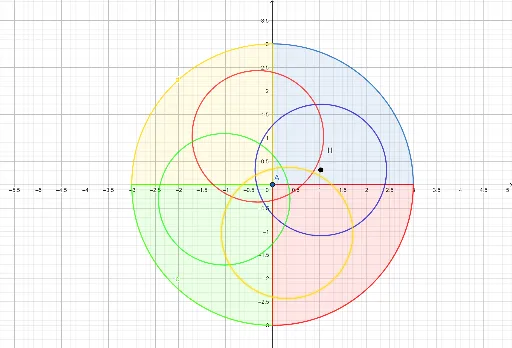
This example demonstrates how to construct a circle on a cone. Key mathematical concepts include circles, cones, and rotation. Using GeoGebra commands such as Point, CircleSector, Circle, and Rotate, the construction of a circle on a cone is achieved. Suitable for high school geometry and solid geometry studies.
GeoGebra Commands & Parameters
Point(xAxis) → APoint(xAxis) → BCircleSector(A, B, C) → cPoint(xAxis) → DCircleSector(A, C, D) → dPoint(yAxis) → ECircleSector(A, D, E) → eCircleSector(A, E, B) → fPoint(f) → FPoint(f) → GCircle(H, I) → gRotate(g, 90°, A) → g'Rotate(g, 180°, A) → g'_1Rotate(g, 270°, A) → g'_2
AI Drawing Prompt Reference
Draw a cone and construct a circle on its surface. Start by placing two points on the base of the cone, then draw three sectors using these points and the cone's apex. Next, place two more points on the base's axis and draw three more sectors with these points and the apex. Finally, draw a circle on one of the sectors' arcs, then rotate this circle 90°, 180°, and 270° around the apex to create three identical circles, illustrating the formation of a circle on the cone's surface.
The prompt above was compiled from the original drawing commands and is for reference only.