
System of Linear DEs with Real Repeated Eigenvalues
Loading the math board and drawing, please wait…
In collections
Differential Equations
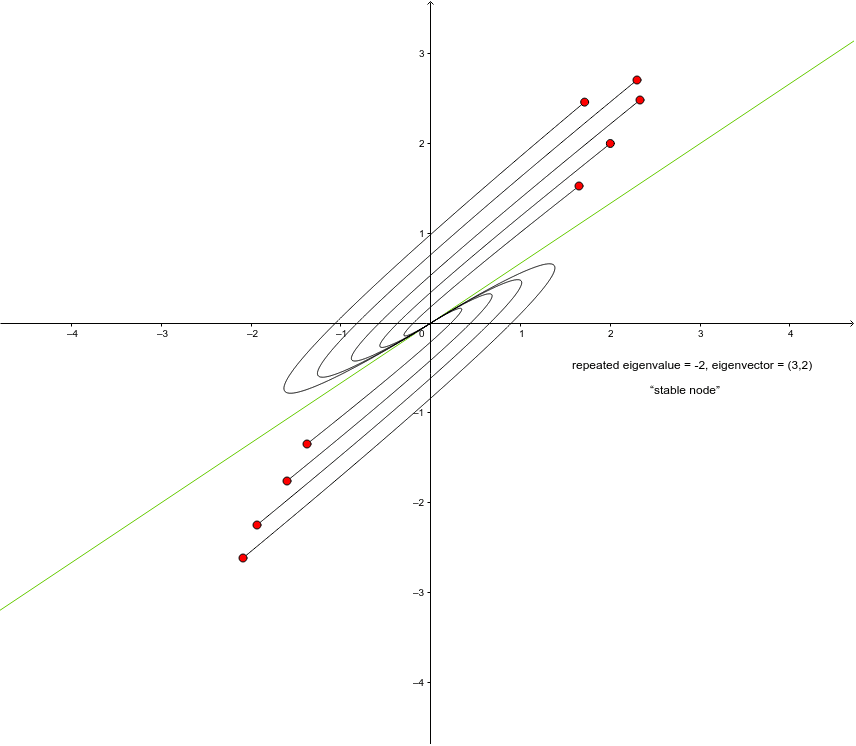
This example demonstrates the phase portrait of a linear system of differential equations with constant coefficients and two real, equal (repeated) eigenvalues. It uses commands like SolveODE, Intersect, and Line to construct the system, suitable for studying linear differential equations and phase portraits.
GeoGebra Commands & Parameters
SolveODE(g, f, x(A), y(A), 10, 0.001) → numericalIntegral1SolveODE(g, f, x(D), y(D), 10, 0.001) → numericalIntegral2SolveODE(g, f, x(E), y(E), 10, 0.001) → numericalIntegral3SolveODE(g, f, x(B), y(B), 10, 0.001) → numericalIntegral4SolveODE(g, f, x(C), y(C), 10, 0.001) → numericalIntegral5SolveODE(g, f, x(G), y(G), 10, 0.001) → numericalIntegral7SolveODE(g, f, x(H), y(H), 10, 0.001) → numericalIntegral6SolveODE(g, f, x(F), y(F), 10, 0.001) → numericalIntegral8SolveODE(g, f, x(I), y(I), 10, 0.001) → numericalIntegral9Intersect(xAxis, yAxis) → JLine(J, K) → a
AI Drawing Prompt Reference
Draw the phase portrait of a linear system of differential equations with two real and equal eigenvalues. First, use the SolveODE command to solve the differential equations and obtain numerical integration results. Then, find the intersection point J of the x-axis and y-axis, and draw a line a connecting point J and K.
The prompt above was compiled from the original drawing commands and is for reference only.