
Symmetry the Right Way: Polygon Mirror Construction
Loading the math board and drawing, please wait…
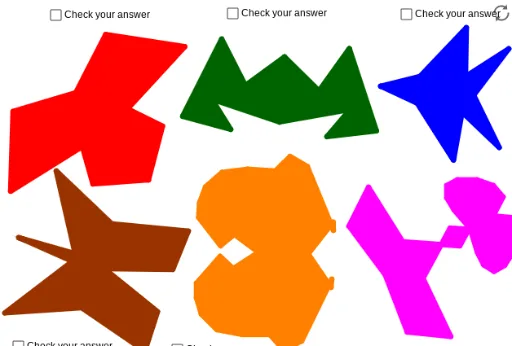
This example demonstrates how to construct symmetric polygons using mirror transformations, showing that the reflected shape coincides exactly with the original across the axis of symmetry. Core mathematical concepts include axial symmetry, reflection transformation, polygon properties, and the role of symmetry in geometric reasoning. Construction highlights: using GeoGebra commands Polygon and Mirror, the initial polygon poly1 is created from points A-F, then mirrored across a segment to form poly2, and further mirrored to produce poly3; objects include points A through S, segments a through r, and polygons poly1, poly2, poly3. Suitable for middle and high school geometry classes, this example helps students visualize symmetry, verify congruence under reflection, and practice using mirror tools in dynamic geometry software.
GeoGebra Commands & Parameters
Polygon(A, B, C, D, E, F) → poly1, a, b, c, d, e, fPolygon(G, H, I, J, K, L, M) → poly2, g, h, i, j, k, l, mPolygon(N, O, P, Q, R, S) → poly3, n, o, p, q, r, sPolygon(T, U, V, W, Z, A_1, B_1) → poly4, t, u, v, w, z, a_1, b_1Polygon(C_1, E_1, O_1, P_1, Q_1, R_1, F_1, H_1, I_1, J_1, K_1, L_1, M_1, N_1) → poly5, c_1, n_1, o_1, p_1, q_1, r_1, e_1, f_1, h_1, i_1, j_1, k_1, l_1, m_1Polygon(G_1, S_1, E_2, F_2, G_2, H_2, I_2, J_2, T_1, U_1, V_1, W_1, Z_1, B_2, C_2, D_2) → poly6, g_1, d_2, e_2, f_2, g_2, h_2, i_2, j_2, s_1, t_1, u_1, v_1, w_1, z_1, b_2, c_2Mirror(A, f) → A'Mirror(B, f) → B'Mirror(C, f) → C'Mirror(D, f) → D'Mirror(E, f) → E'Mirror(F, f) → F'Polygon(A', B', C', D', E', F') → poly1', a', b', c', d', e', f'Mirror(G, k) → G'Mirror(H, k) → H'Mirror(I, k) → I'Mirror(J, k) → J'Mirror(K, k) → K'Mirror(L, k) → L'Mirror(M, k) → M'Polygon(G', H', I', J', K', L', M') → poly2', g', h', i', j', k', l', m'Mirror(N, n) → N'Mirror(O, n) → O'Mirror(P, n) → P'Mirror(Q, n) → Q'Mirror(R, n) → R'Mirror(S, n) → S'Polygon(N', O', P', Q', R', S') → poly3', n', o', p', q', r', s'Mirror(T, v) → T'Mirror(U, v) → U'Mirror(V, v) → V'Mirror(W, v) → W'Mirror(Z, v) → Z'Mirror(A_1, v) → A_2Mirror(B_1, v) → K_2Polygon(T', U', V', W', Z', A_2, K_2) → poly4', t', u', v', w', z', a_2, k_2Mirror(C_1, r_1) → L_2Mirror(E_1, r_1) → M_2Mirror(F_1, r_1) → N_2Mirror(H_1, r_1) → O_2Mirror(I_1, r_1) → P_2Mirror(J_1, r_1) → Q_2Mirror(K_1, r_1) → R_2Mirror(L_1, r_1) → S_2Mirror(M_1, r_1) → T_2Mirror(N_1, r_1) → U_2Mirror(O_1, r_1) → V_2Mirror(P_1, r_1) → W_2Mirror(Q_1, r_1) → Z_2Mirror(R_1, r_1) → A_3Polygon(L_2, M_2, V_2, W_2, Z_2, A_3, N_2, O_2, P_2, Q_2, R_2, S_2, T_2, U_2) → poly5', l_2, u_2, v_2, w_2, z_2, a_3, m_2, n_2, o_2, p_2, q_2, r_2, s_2, t_2Mirror(G_1, h_2) → B_3Mirror(S_1, h_2) → C_3Mirror(T_1, h_2) → D_3Mirror(U_1, h_2) → E_3Mirror(V_1, h_2) → F_3Mirror(W_1, h_2) → G_3Mirror(Z_1, h_2) → H_3Mirror(B_2, h_2) → I_3Mirror(C_2, h_2) → J_3Mirror(D_2, h_2) → K_3Mirror(E_2, h_2) → L_3Mirror(F_2, h_2) → M_3Mirror(G_2, h_2) → N_3Mirror(H_2, h_2) → O_3Mirror(I_2, h_2) → P_3Mirror(J_2, h_2) → Q_3Polygon(B_3, C_3, L_3, M_3, N_3, O_3, P_3, Q_3, D_3, E_3, F_3, G_3, H_3, I_3, J_3, K_3) → poly6', b_3, k_3, l_3, m_3, n_3, o_3, p_3, q_3, c_3, d_3, e_3, f_3, g_3, h_3, i_3, j_3Segment(R_3, S_3) → d_1Segment(T_3, U_3) → r_3Segment(V_3, W_3) → s_3Segment(Z_3, A_4) → t_3Segment(B_4, D_1) → a_4Segment(C_4, D_4) → b_4
AI Drawing Prompt Reference
Create a geometric figure demonstrating axial symmetry. Start with a hexagon, then a heptagon, and another hexagon, each reflected across a distinct line segment to produce mirrored polygons that coincide exactly with the originals. Next, add a heptagon, a 14-sided polygon, and a 16-sided polygon, each mirrored across one of its sides to generate further symmetric shapes. All reflected polygons should align perfectly with their sources across the symmetry axes, illustrating that reflection preserves shape and size. The figure should include multiple polygons, axis segments, and their mirrored counterparts, showing the construction process of symmetry.
The prompt above was compiled from the original drawing commands and is for reference only.