
Symmetry Number of a Complex System by Timur Kapitsa
Loading the math board and drawing, please wait…
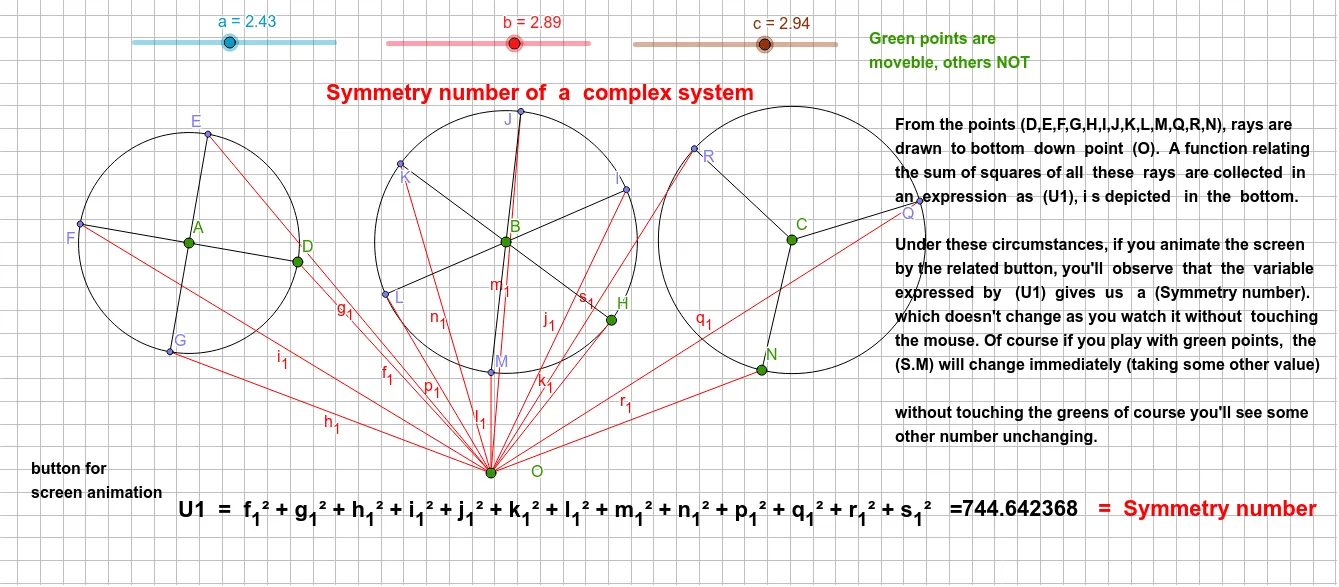
This example demonstrates the geometric representation and calculation of symmetry in complex systems. It involves core mathematical concepts such as symmetry, geometric transformations, vectors, and polygons. Key GeoGebra commands/objects used include Circle, Point, Segment, Rotate, and Angle. Suitable for high school mathematics students and geometry enthusiasts.
GeoGebra Commands & Parameters
Circle(C, c) → fPoint(f) → NSegment(N, O) → r_1Rotate(N, 120°, C) → QSegment(Q, O) → q_1Rotate(Q, 120°, C) → RSegment(R, O) → s_1Circle(B, b) → ePoint(e) → HSegment(H, O) → k_1Rotate(H, 60°, B) → ISegment(I, O) → j_1Rotate(I, 60°, B) → JSegment(J, O) → m_1Rotate(J, 60°, B) → KSegment(K, O) → n_1Rotate(K, 60°, B) → LSegment(L, O) → p_1Rotate(L, 60°, B) → MSegment(M, O) → l_1Circle(A, a) → dPoint(d) → DSegment(D, O) → f_1Rotate(D, (-(90°)), A) → GSegment(G, O) → h_1Rotate(D, 90°, A) → ESegment(E, O) → g_1Rotate(E, 90°, A) → FSegment(F, O) → i_1Segment(A, D) → gAngle(D, A, E) → αSegment(A, E) → hAngle(E, A, F) → βSegment(A, F) → iAngle(G, A, D) → δSegment(A, G) → jSegment(B, H) → kAngle(H, B, I) → γSegment(B, I) → lAngle(I, B, J) → εSegment(B, J) → mAngle(J, B, K) → ζSegment(B, K) → nAngle(K, B, L) → ηSegment(B, L) → pAngle(L, B, M) → θSegment(B, M) → qSegment(C, N) → rAngle(N, C, Q) → ιSegment(C, Q) → sAngle(Q, C, R) → κSegment(C, R) → t
AI Drawing Prompt Reference
Draw a complex symmetric system with a circle and three 60-degree rotated points to form a hexagon. Then, rotate points around the circle center by 90 degrees to form a square. Finally, connect the circle center with the points on the circle to form multiple angle markings.
The prompt above was compiled from the original drawing commands and is for reference only.