
Symmetry and Translation by leucotea
Loading the math board and drawing, please wait…
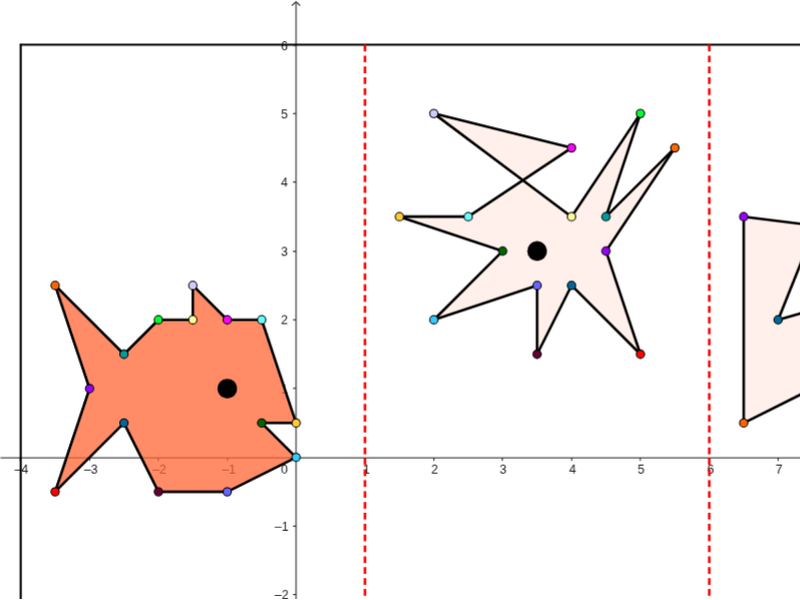
This example demonstrates the construction of symmetric figures. Key mathematical concepts include symmetry and translation. Using GeoGebra commands such as Line, Polygon, Intersect, Segment, Mirror, etc., symmetric figures can be constructed. Suitable for students at the junior high school level and above for learning geometric transformations.
GeoGebra Commands & Parameters
Line(A, B) → aLine(C, D) → bPolygon(E, F, G, H) → poli1, e, f, g, hIntersect(e, a) → IIntersect(a, g) → JIntersect(b, g) → KIntersect(b, e) → LSegment(I, J) → cSegment(L, K) → dPolygon(C_1, Q, B_1, M, N, O, P, R, S, T, U, V, W, Z, A_1) → poli2, c_1, a_1, b_1, m, n, o, p, q, r, s, t, u, v, w, zPolygon(E_1, F_1, O_1, P_1, Q_1, R_1, S_1, G_1, H_1, I_1, J_1, K_1, L_1, M_1, N_1) → poli3, e_1, n_1, o_1, p_1, q_1, r_1, s_1, f_1, g_1, h_1, i_1, j_1, k_1, l_1, m_1Polygon(T_1, U_1, F_2, G_2, H_2, I_2, J_2, V_1, W_1, Z_1, A_2, B_2, C_2, D_2, E_2) → poli4, t_1, e_2, f_2, g_2, h_2, i_2, j_2, u_1, v_1, w_1, z_1, a_2, b_2, c_2, d_2Mirror(C_1, c) → K_2Mirror(Q, c) → Q'Mirror(R, c) → R'Mirror(S, c) → S'Mirror(T, c) → T'Mirror(U, c) → U'Mirror(V, c) → V'Mirror(W, c) → W'Mirror(Z, c) → Z'Mirror(A_1, c) → L_2Mirror(B_1, c) → M_2Mirror(M, c) → M'Mirror(N, c) → N'Mirror(O, c) → O'Mirror(P, c) → P'Polygon(K_2, Q', M_2, M', N', O', P', R', S', T', U', V', W', Z', L_2) → poli2', k_2, l_2, m_2, m', n', o', p', q', r', s', t', u', v', w', z'Mirror(K_2, d) → N_2Mirror(Q', d) → Q''Mirror(R', d) → R''Mirror(S', d) → S''Mirror(T', d) → T''Mirror(U', d) → U''Mirror(V', d) → V''Mirror(W', d) → W''Mirror(Z', d) → Z''Mirror(L_2, d) → O_2Mirror(M_2, d) → P_2Mirror(M', d) → M''Mirror(N', d) → N''Mirror(O', d) → O''Mirror(P', d) → P''Polygon(N_2, Q'', P_2, M'', N'', O'', P'', R'', S'', T'', U'', V'', W'', Z'', O_2) → poli2'', n_2, o_2, p_2, m'', n'', o'', p'', q'', r'', s'', t'', u'', v'', w'', z''Mirror(D_1, c) → Q_2Mirror(Q_2, d) → R_2If(S_2 ≟ Q_2, 1, 0) → a1If(T_2 ≟ R_2, 1, 0) → b1If(L_1 ≟ S' ∧ K_1 ≟ R', 2, 0) → a2If(D_2 ≟ S'' ∧ E_2 ≟ R'', 2, 0) → b2If(J_1 ≟ Q' ∧ I_1 ≟ K_2, 2, 0) → a3If(F_2 ≟ Q'' ∧ G_2 ≟ N_2, 2, 0) → b3If(H_2 ≟ P'' ∧ I_2 ≟ O'', 2, 0) → b4If(H_1 ≟ P' ∧ G_1 ≟ O', 2, 0) → a4If(F_1 ≟ N', 1, 0) → a5If(J_2 ≟ N'', 1, 0) → b5If(E_1 ≟ M', 1, 0) → a6If(T_1 ≟ M'', 1, 0) → b6If(S_1 ≟ M_2, 1, 0) → a7If(U_1 ≟ P_2, 1, 0) → b7If(R_1 ≟ L_2, 1, 0) → a8If(V_1 ≟ O_2, 1, 0) → b8If(Q_1 ≟ Z', 1, 0) → a9If(W_1 ≟ Z'', 1, 0) → b9If(P_1 ≟ W', 1, 0) → a10If(Z_1 ≟ W'', 1, 0) → b10If(O_1 ≟ V', 1, 0) → a11If(A_2 ≟ V'', 1, 0) → b11If(N_1 ≟ U', 1, 0) → a12If(B_2 ≟ U'', 1, 0) → b12If(M_1 ≟ T', 1, 0) → a13If(C_2 ≟ T'', 1, 0) → b13Point(q_2) → U_2
AI Drawing Prompt Reference
Draw a symmetric figure composed of quadrilaterals ABCD and EFGH. First, draw lines AB and CD, then draw quadrilateral EFGH. Find the intersection points I, J, K, and L where lines AB and CD intersect with quadrilateral EFGH, and connect segments IJ and KL. Next, draw a complex polygon C1Q1B1MNPQRUVWZA1 and use mirror operations to generate its symmetric figure C1Q1B1MNPQRUVWZA1'. Finally, use multiple mirror operations to generate the symmetric figure C1Q1B1MNPQRUVWZA1''.
The prompt above was compiled from the original drawing commands and is for reference only.