
Interactive Pascal's Triangle Demonstration
Loading the math board and drawing, please wait…
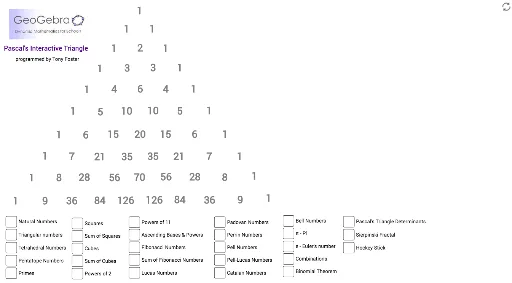
This example demonstrates the construction and properties of Pascal's Triangle through interactive manipulation, showcasing its numerical patterns and symmetry. It involves core mathematical concepts like sequences, combinatorics, binomial theorem, and geometric transformations. The construction utilizes GeoGebra commands and objects such as Polygon, Segment, Point, Rotate, and Intersect. Suitable for high school and above, it illustrates the integration of combinatorial mathematics and geometric constructions.
GeoGebra Commands & Parameters
Polygon(A, B, 3) → poly1, n, f_1, h_1, CPolygon(A_1, B_1, 3) → poly1_1, n_1, f_2, h_2, C_1Polygon(A_2, B_2, 3) → poly1_2, n_2, f_3, h_4, C_2Polygon(A_3, B_3, 3) → poly1_3, n_3, f_4, h_5, C_3Segment(H, I) → g_1Segment(H_1, I_1) → g_2Segment(H_2, I_2) → g_3Segment(H_3, I_3) → g_4Segment(H_4, I_4) → g_5Segment(H_5, I_5) → g_6Segment(H_6, I_6) → g_7Segment(H_7, I_7) → g_8Segment(L, M) → j_1Point(j_1) → NSegment(N, O) → k_1Segment(M, P) → l_1Segment(Q, R) → i_1Segment(S, T) → m_1Segment(W, Z) → p_1Segment(D_1, E_1) → q_1Segment(J_1, K_1) → r_1Segment(L_1, M_1) → s_1Segment(P_1, Q_1) → t_1Segment(P_2, Q_2) → t_2Segment(P_3, Q_3) → t_3Segment(P_4, Q_4) → t_4Segment(P_5, Q_5) → t_5Segment(P_6, Q_6) → t_6Segment(M_2, N_2) → a_1Segment(M_3, N_3) → a_2Segment(M_4, N_4) → a_3Segment(T_2, U_2) → e_1Segment(T_3, U_3) → e_2Segment(T_4, U_4) → e_3Segment(V_2, W_2) → c_1Polygon(Z_2, D_3, 4) → poly2, i_2, j_2, k_2, l_2, E_3, F_3Segment(C_4, D_4) → b_1Segment(D_4, E_4) → d_1Segment(F_4, G_4) → m_2Segment(G_4, J_4) → p_2Point(Circle[K_4, 1.8503665963061509]) → L_4Point(Circle[K_5, 1.8503665963061509]) → L_5Point(Circle[K_6, 1.8503665963061509]) → L_6Point(Circle[R_4, 2.557437046452202]) → S_4Point(Circle[W_4, Segment[R_4, S_4]]) → Z_4Rotate(Z_4 + (Segment[S_4, V_4], 0), Angle[V_4 - S_4] + Angle[Z_4 - W_4] - Angle[S_4 - R_4], Z_4) → A_5Point(Circle[R_5, 2.557437046452202]) → S_5Polygon(R_5, S_5, V_5) → poly4_1, v_1, r_2, s_2Point(Circle[W_5, Segment[R_5, S_5]]) → Z_5Rotate(Z_5 + (Segment[S_5, V_5], 0), Angle[V_5 - S_5] + Angle[Z_5 - W_5] - Angle[S_5 - R_5], Z_5) → A_6Segment(B_5, C_5) → q_2Segment(B_5, D_5) → b_2Point(Circle[E_5, 1.6189147873363703]) → F_5Point(Circle[F_5, 1.9564697237334108]) → J_5Point(Circle[N_5, 1.8399017340850627]) → T_5Polygon(N_5, T_5, U_5) → poly5, u_5, n_5, t_7Point(Circle[J_5, 2.1812936747652714]) → B_6Point(q_2) → D_6Point(Circle[D_6, 2.1766130533787167]) → F_6Point(Circle[E_6, 2.218805743574816]) → J_6Point(Circle[N_6, 2.076966620956787]) → R_6Point(Circle[R_6, 2.096296584038995]) → T_6Polygon(R_6, T_6, U_6) → poly11, u_6, r_3, t_8Point(Circle[V_6, 2.149589058189039]) → W_6Polygon(V_6, W_6, Z_6) → poly12, z_6, v_6, w_6Point(Circle[A_7, 2.1077280446071045]) → B_7Polygon(A_7, B_7, C_7) → poly6, c_7, a_7, b_7Intersect(n_5, t_7) → D_7Point(Circle[F_7, 2.10664200664006]) → G_7Polygon(F_7, G_7, J_7) → poly10, j_7, f_8, g_{11}Point(q_2) → E_7Point(Circle[E_7, 2.284619007065576]) → L_7Polygon(E_7, L_7, M_7) → poly7, m_7, e_7, l_7Point(Circle[P_7, 2.090488994709375]) → Q_7Point(Circle[N_7, 1.9992802498775035]) → O_7Polygon(N_7, O_7, S_7) → poly8, s_7, n_7, o_7Point(Circle[K_7, 2.02232664935158]) → T_7Polygon(K_7, T_7, U_7) → poly9, u_7, k_7, t_9Point(Circle[V_7, 2.1250291678347835]) → W_7Polygon(V_7, W_7, Z_7) → poly13, z_7, v_7, w_7Intersect(z_7, v_7) → A_8Intersect(a_7, b_7) → B_8Segment(A_8, B_8) → c_2Point(Circle[C_8, 1.9329341587930147]) → D_8Point(Circle[F_8, 1.8274213340827847]) → G_8Polygon(F_8, G_8, H_8) → poly4, h_8, f_6, g_{10}Point(Circle[I_8, 1.8438621070570156]) → J_8Polygon(I_8, J_8, K_8) → poly14, k_8, i_8, j_8
AI Drawing Prompt Reference
Draw an interactive geometric demonstration of Pascal's Triangle, featuring multiple triangles and line segments, constructed through rotations and intersections to form the triangular pattern, highlighting its numerical patterns and symmetry for high school mathematics.
The prompt above was compiled from the original drawing commands and is for reference only.