
Spiral A-Series Paper: Iterated Trig Geometry
Loading the math board and drawing, please wait…
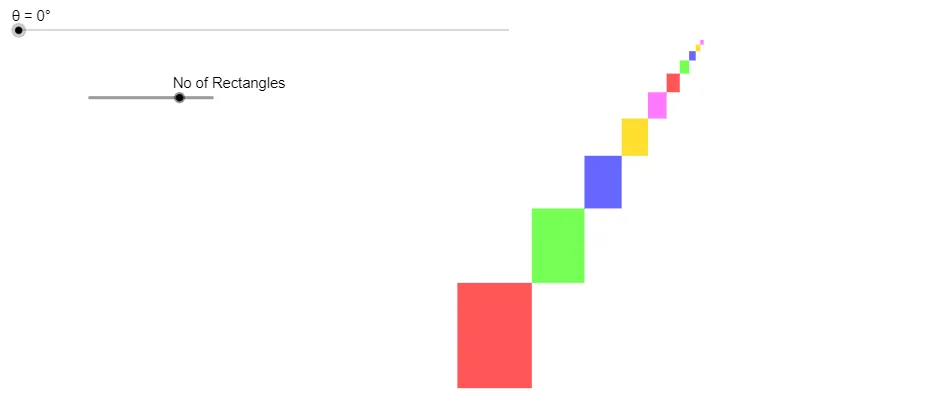
This example demonstrates how an “A-Series Paper” style spiral can be generated in the plane using iterative rules that couple angles and scaling. It highlights fractal/iterative geometry, trigonometric relationships (e.g., sine-driven angle/length dependencies), and ratio-based parameter control using arithmetic operations with rational relationships. The construction uses geometric transformation ideas by repeatedly creating segments and polygons whose endpoints are updated each step, effectively tracing a spiral-like curve and showing how its structure emerges over many iterations. In GeoGebra, the key workflow comes from the construction summary: Segment and Polygon are used to define the building blocks; Sequence generates the evolving parameters/point lists; and IterationList performs the multi-step recursion to assemble the successive pieces into the final spiral geometry. The involved objects include anchor points (A, B, C, D, and E/F/G), parameters (l, q1, q2, a, b, c, d), angular variables (α, θ), and the iteration count N, enabling synchronized updates of geometry and trigonometric constraints. Suitable for high-school advanced classes through early university learners, and ideal for teaching fractal iteration, parametric control, and trigonometry-based geometric construction.
GeoGebra Commands & Parameters
Segment(A, B) → lPolygon(A, C, B, D) → q1, a, c, b, dPolygon(B, F, E, G) → q2, b_1, f, e, gSegment(B, E) → hSequence({sqrt(3) / sqrt(2)^(i), α - (i * θ)}, i, 0, N - 1) → l1IterationList({Element[v, 1] + 1, Element[v, 2] + (Element[l1, Element[v, 1], 1] * cos(Element[l1, Element[v, 1], 2])), Element[v, 3] + (Element[l1, Element[v, 1], 1] * sin(Element[l1, Element[v, 1], 2]))}, v, {{1, x(A), y(A)}}, N - 1) → m1Sequence((Element[m1, i, 2], Element[m1, i, 3]), i, 1, N) → l2Sequence({1 / sqrt(2)^(i), ((-i) * θ)}, i, 0, N - 1) → l3IterationList({Element[v, 1] + 1, x(l2(Element[v, 1])) + (Element[l3, Element[v, 1], 1] * cos(Element[l3, Element[v, 1], 2])), y(l2(Element[v, 1])) + (Element[l3, Element[v, 1], 1] * sin(Element[l3, Element[v, 1], 2]))}, v, {{1, x(A), y(A)}}, N - 1) → m2Sequence(Segment[l2(i), l2(i + 1)], i, 1, N - 1) → l5Sequence((Element[m2, i, 2], Element[m2, i, 3]), i, 1, N) → l4Sequence({1 / sqrt(2)^(i - 1), 90° - (i * θ)}, i, 0, N - 1) → l6IterationList({Element[v, 1] + 1, x(l2(Element[v, 1])) + (Element[l6, Element[v, 1], 1] * cos(Element[l6, Element[v, 1], 2])), y(l2(Element[v, 1])) + (Element[l6, Element[v, 1], 1] * sin(Element[l6, Element[v, 1], 2]))}, v, {{1, x(A), y(A)}}, N - 1) → m3Sequence((Element[m3, i, 2], Element[m3, i, 3]), i, 1, N) → l7Sequence(Polygon[l2(i), l4(i + 1), l2(i + 1), l7(i + 1)], i, 1, N - 1, 5) → l8Sequence(Polygon[l2(i), l4(i + 1), l2(i + 1), l7(i + 1)], i, 2, N - 1, 5) → l9Sequence(Polygon[l2(i), l4(i + 1), l2(i + 1), l7(i + 1)], i, 3, N - 1, 5) → l10Sequence(Polygon[l2(i), l4(i + 1), l2(i + 1), l7(i + 1)], i, 4, N - 1, 5) → l11Sequence(Polygon[l2(i), l4(i + 1), l2(i + 1), l7(i + 1)], i, 5, N - 1, 5) → l12
AI Drawing Prompt Reference
Draw an A-series paper style spiral. The spiral is generated by iterative steps that update point positions based on angle and scaling factors. Start with anchor point A, and parameters include scaling ratios and angle variable θ. The construction order: first define initial segments and triangles, then use iteration lists to generate point lists, and finally connect points using sequences and iteration lists to form the spiral curve. The spiral shows a spiral shape with angle and scaling relationships changing with iteration count.
The prompt above was compiled from the original drawing commands and is for reference only.