
Surface Area of Cones
Loading the math board and drawing, please wait…
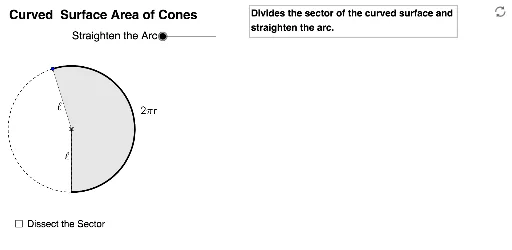
This example demonstrates how to calculate the curved surface area of a cone with base radius [i]r[/i] and slanted height [i]l[/i]. By adjusting sliders, you can dynamically observe the shape changes of the cone. Key mathematical concepts include the geometric properties of cones and area calculations. The construction uses GeoGebra commands such as Point, If, Sequence, Segment, Min, Max, CircleArc, Midpoint, CircleSector, and Circle. Suitable for middle school and above students learning solid geometry.
GeoGebra Commands & Parameters
Point(CircleArc[(0, 1), (1, 1), (0, 0)]) → AIf(y(A) > 0, Angle[(0, 0), (0, 1), A], 6.283185307179586) → αSequence((sin((i * θ)), 1 - cos((i * θ))), i, 0, (2 * n)) → list1Segment(E, (x(E) + 1, y(E))) → aPoint(a) → FMin((2 * (x(F) - x(E))), 1) → kMax((2 * (x(F) - x(E))) - 1, 0) → k'Sequence(If[k < 1, (x(O) + ((l * sin((i * φ))) * cos((i * φ)) / sin(φ)), y(O) + ((l * sin((i * φ))) * sin((i * φ)) / sin(φ))), (x(O) + (l * i), y(O))], i, 0, (2 * n)) → list2Sequence(Sector[Rotate[Translate[Circle[(x(O) + 0, y(O) + 1), Element[list1, i]], Vector[Element[list1, i], Element[list2, i]]], (((-((2 * i) - 1)) * k) * θ / 2), Element[list2, i]], Rotate[Translate[Element[list1, i], Vector[Element[list1, i], Element[list2, i]]], (((-((2 * i) - 1)) * k) * θ / 2), Element[list2, i]], Rotate[Translate[Element[list1, i + 1], Vector[Element[list1, i], Element[list2, i]]], (((-((2 * i) - 1)) * k) * θ / 2), Element[list2, i]]], i, 1, n) → list3Sequence(Sector[Rotate[Rotate[Translate[Circle[(x(O) + 0, y(O) + 1), Element[list1, i]], Vector[Element[list1, i], Element[list2, i]]], (((-((2 * i) - 1)) * k) * θ / 2), Element[list2, i]], (180° * k'), (x(O) + (n * l) - sin(θ / 2) / 2, y(O) + cos(θ / 2) / 2)], Rotate[Rotate[Translate[Element[list1, i], Vector[Element[list1, i], Element[list2, i]]], (((-((2 * i) - 1)) * k) * θ / 2), Element[list2, i]], (180° * k'), (x(O) + (n * l) - sin(θ / 2) / 2, y(O) + cos(θ / 2) / 2)], Rotate[Rotate[Translate[Element[list1, i + 1], Vector[Element[list1, i], Element[list2, i]]], (((-((2 * i) - 1)) * k) * θ / 2), Element[list2, i]], (180° * k'), (x(O) + (n * l) - sin(θ / 2) / 2, y(O) + cos(θ / 2) / 2)]], i, n + 1, (2 * n)) → list4If(y(A) > 0, CircleArc[(0, 1), (0, 0), A], 6.283185307179586) → sCircleArc((0, 1 / (1 - m)), O, L) → bSegment((0, 0), (s, 0)) → dMidpoint(d) → B'CircleArc((0, 1), A, (0, 0)) → cMidpoint(a) → CPoint(Segment[(0, 1), (s, 1)]) → DSegment(D, (x(D), y(D) - 1)) → eMidpoint(e) → GCircleSector((0, 1), (0, 0), A) → fCircle((0, 1), 1) → gMidpoint(A, D) → H
AI Drawing Prompt Reference
Draw the lateral surface of a cone unrolled into a sector, showing how the curved surface transforms. The base radius and slant height of the cone can be dynamically adjusted using sliders. Begin by sketching the base circle and the lateral surface of the cone, then unroll it into a sector where the arc length equals the circumference of the base circle and the radius equals the slant height. Observe how changes in the cone's dimensions affect the sector's size and shape by adjusting the sliders.
The prompt above was compiled from the original drawing commands and is for reference only.