
Surface Area of a Sphere by craig.fournier
Loading the math board and drawing, please wait…
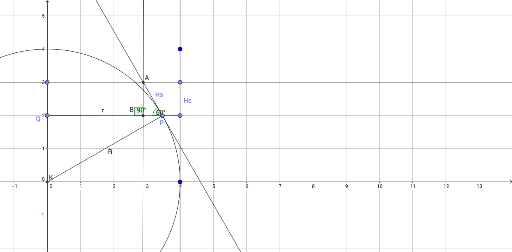
This example demonstrates the dynamic calculation of a sphere's surface area through interactive methods. Key math concepts include solid geometry, circle properties, trigonometry, and optimization problems. GeoGebra commands and objects used in construction are Intersect, Circle, Point, Segment, Line, Tangent, OrthogonalLine, and Angle. Suitable for high school and above students to understand 3D shape surface area calculations and optimization techniques.
GeoGebra Commands & Parameters
Intersect(xAxis, yAxis) → KCircle(K, B_1) → cPoint(c) → PSegment(K, P) → RPoint(yAxis) → QSegment(P, Q) → rPoint(yAxis) → E_1Line(B_1, H) → EPoint(E) → HsLine(Hs, xAxis) → hTangent(P, c) → j,Intersect(h, j) → AOrthogonalLine(A, r) → kIntersect(k, r) → BAngle(A, P, B) → αAngle(A, B, Q) → βPoint(E) → HcSegment(P, Hc) → f
AI Drawing Prompt Reference
Draw a sphere to demonstrate the calculation of its surface area. Start by plotting the intersection of the coordinate axes, then draw a circle centered at this point and mark a point on the circle. Connect the center to this point to form a radius. Take a point on the vertical axis and connect it to the center to form a line. Next, draw a tangent to the circle at the point and find its intersection with the perpendicular line from the center to the vertical axis. Measure the angles formed by the center, intersection, and tangent point. Finally, connect the center to the intersection of the perpendicular line to show the surface area calculation process.
The prompt above was compiled from the original drawing commands and is for reference only.