
Rectangular Prism Construction in GeoGebra
Loading the math board and drawing, please wait…
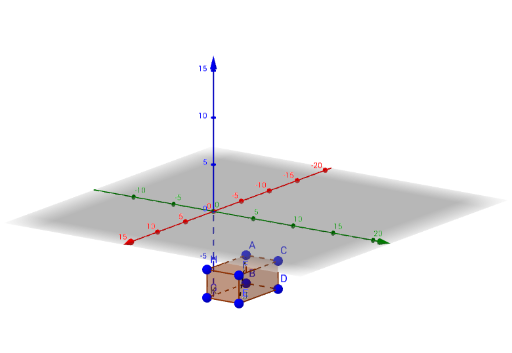
This GeoGebra example demonstrates the 3D construction of a standard rectangular prism (also known as a cuboid). The core mathematical concept is solid geometry, specifically prisms with rectangular faces, involving vertices, edges, faces, and their parallel/perpendicular relationships. Construction details: the example uses the Segment command to create edges and the Prism command to generate the solid from those segments; it defines vertices A, B, C, D, E, F, G, H plus auxiliary points I, J, K, and produces six rectangular faces (e.g., faceABDC, faceACIH, faceCDJI, faceBDJK, faceABKH, faceHIJK) and twelve edges (e.g., edgeAC, edgeCD, edgeBD, edgeAB, edgeAH, edgeCI, edgeDJ, edgeBK, edgeHI, edgeIJ, edgeJK, edgeHK). This example is suitable for middle or high school geometry lessons, helping students visualize the structure of a rectangular prism, understand the correspondence between faces and edges, and learn basic 3D construction commands in GeoGebra.
GeoGebra Commands & Parameters
Segment(A, E) → fPrism(A, C, D, B, H) → a, I, edgeAC, edgeCD, edgeBD, edgeAB, edgeAH, edgeCI, edgeDJ, edgeBK, edgeHI, edgeIJ, J, edgeJK, edgeHK, K, faceABDC, faceACIH, faceCDJI, faceBDJK, faceABKH, faceHIJK
AI Drawing Prompt Reference
Draw a standard rectangular prism (cuboid). Start by defining four vertices on the base to form a rectangle. Then, from one base vertex, extend a vertical edge upward to determine a top vertex, and use this to generate the entire prism. The prism has eight vertices, twelve edges, and six rectangular faces, with opposite faces parallel and congruent, and adjacent faces perpendicular. Construct by first drawing the base rectangle, then the four vertical edges, and finally connecting the top four vertices to form the top face, ensuring all faces are rectangles.
The prompt above was compiled from the original drawing commands and is for reference only.