
Surface Area of a Cube: Interactive Visualization
Loading the math board and drawing, please wait…
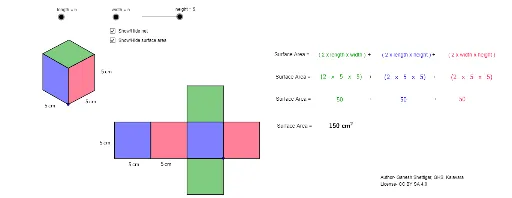
① This example demonstrates the surface area of a cube through an interactive 3D geometric visualization, making the formula and its meaning intuitive. ② Core mathematical concepts include solid geometry, cube properties, surface area calculation, and the relationship between edge length and face area, emphasizing the sum of six congruent square faces. ③ Construction highlights: Using GeoGebra commands such as Vector, Translate, Polygon, Line, Intersect, and Midpoint, the cube's vertices A, B, C, D and edge vectors u, v, w are defined; faces poly1, poly2, poly3 are generated via translation, with auxiliary points E, F, G, H and additional polygons to complete the 3D structure. ④ Suitable for middle school to high school students learning introductory solid geometry, and useful for teachers demonstrating surface area derivation or for students exploring the concept independently.
GeoGebra Commands & Parameters
Vector(A, B) → uVector(A, C) → vVector(A, D) → wTranslate(E, Vector[(height * u)]) → E'Vector(E, E') → zTranslate(E, Vector[(width * w)]) → E'_1Translate(E, Vector[(length * v)]) → E'_2Translate(E'_2, Vector[(height * u)]) → FTranslate(E'_1, Vector[(height * u)]) → GPolygon(F, E'_2, E, E') → poly1, f, e'_2, e, e'Polygon(E, E'_1, G, E') → poly2, e_1, e'_1, g, e'_3Line(F, g) → dLine(G, e') → hIntersect(d, h) → HPolygon(F, E', G, H) → poly3, f_1, e'_4, g_1, h_1Polygon(J, I, K, L) → poly4, j, i, k, lPolygon(N, J, I, M) → poly5, n, j_1, i_1, mPolygon(N, P, O, M) → poly6, n_1, p, o, m_1Polygon(Q, R, N, J) → poly7, q, r, n_2, j_2Polygon(T, S, I, M) → poly8, t, s, i_2, m_2Polygon(V, U, O, P) → poly9, v_1, u_1, o_1, p_1Midpoint(e'_2) → WMidpoint(e_1) → ZMidpoint(e'_1) → A_1Midpoint(v_1) → B_1Midpoint(u_1) → C_1Midpoint(o) → D_1Midpoint(m_2) → E_1Midpoint(t) → F_1
AI Drawing Prompt Reference
Create an interactive 3D geometric visualization to demonstrate the surface area of a cube, intuitively showing the sum of six congruent square faces and the relationship between edge length and face area, suitable for middle school students learning basic solid geometry. Define the cube's vertices and edge vectors first, then generate the cube's faces through translation, using auxiliary points and additional polygons to complete the 3D structure.
The prompt above was compiled from the original drawing commands and is for reference only.