
Surface Area and Volume of Cylinder
Loading the math board and drawing, please wait…
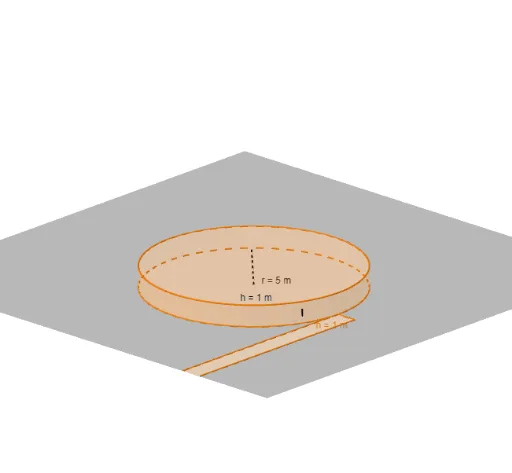
This example demonstrates how to calculate the surface area and volume of a cylinder using geometric construction. Key mathematical concepts include the geometric properties of a cylinder, formulas for area and volume. GeoGebra commands used include circle, point, segment, and orthogonal line. Suitable for middle school and above students or teachers.
GeoGebra Commands & Parameters
Random(1, 5) → nRandom(1, 9) → iIntersect(xAxis, yAxis) → ACircle(A, n) → cCylinder(c, i) → a, d, bIntersect(xAxis, yAxis) → BPoint(c) → C_1Segment(B, C_1) → rPoint(d) → DOrthogonalLine(D, xOyPlane) → jIntersect(j, c, 1) → ESegment(D, E) → hIntersect(c, yAxis, 2) → FPolygon(F, I, H, G) → poly1, C, i_1, h_1, g_1Circle(J, n) → p
AI Drawing Prompt Reference
Draw a cylinder with a base radius of n and height i. First, draw a circle centered at the origin, then construct a cylinder with this circle as the base and height i. Next, take a point B on the x-axis and a point C1 on the circumference, connect B and C1 to represent the height of the cylinder. Then, draw a perpendicular line from the top point D of the cylinder to the xoy plane, intersecting the circumference at point E, and connect D and E. Finally, draw a rectangle with one vertex at the center of the base circle and two points on the circumference as the base, representing the lateral surface of the cylinder.
The prompt above was compiled from the original drawing commands and is for reference only.