
Steps for Multiplying Fractions
Loading the math board and drawing, please wait…
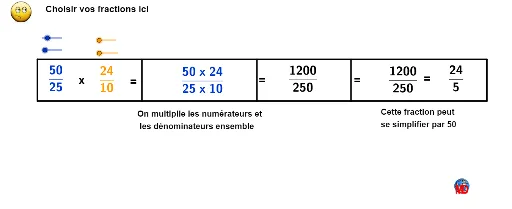
This example demonstrates the steps for multiplying fractions. It involves key mathematical concepts such as fractions, multiplication, and number properties. Using GeoGebra commands like LCM, GCD, and Random, it dynamically illustrates the process of fraction multiplication. Suitable for high-grade elementary and junior high school students learning fraction operations.
GeoGebra Commands & Parameters
LCM(d_1, d_2) → fGCD(d_2, f) → gGCD(f, d_1) → eRandom(2, 15) → aRandomNormal(2, 4) → cRandomBinomial(2, 3) → bnCr(4, 2) → dGCD((n_1 * n_2), (d_1 * d_2)) → hSegment(A, B) → iPoint(i) → CSegment(C, D) → jSegment(A, E) → kSegment(E, D) → lSegment(D, F) → mPoint(i) → GSegment(F, G) → nSegment(F, H) → pPoint(i) → ISegment(I, H) → qSegment(H, J) → rSegment(J, B) → s
AI Drawing Prompt Reference
Draw a diagram illustrating the steps of multiplying fractions. Place two fractions on the canvas with randomly generated numerators and denominators. Compute the least common multiple of the two denominators as the common denominator, and find the greatest common divisors to simplify each fraction. Connect the numerators and denominators with line segments to show the multiplication process. Mark intermediate results with points and connect them with segments to display simplification and multiplication steps. Finally, label the simplified final product below the diagram, using segments and points to represent the multiplied numerator and denominator after reduction. The layout should clearly emphasize the step-by-step calculation of fraction multiplication.
The prompt above was compiled from the original drawing commands and is for reference only.