
Step Through Dependent Difference Test
Loading the math board and drawing, please wait…
In collections
Statistics Step Through Applets
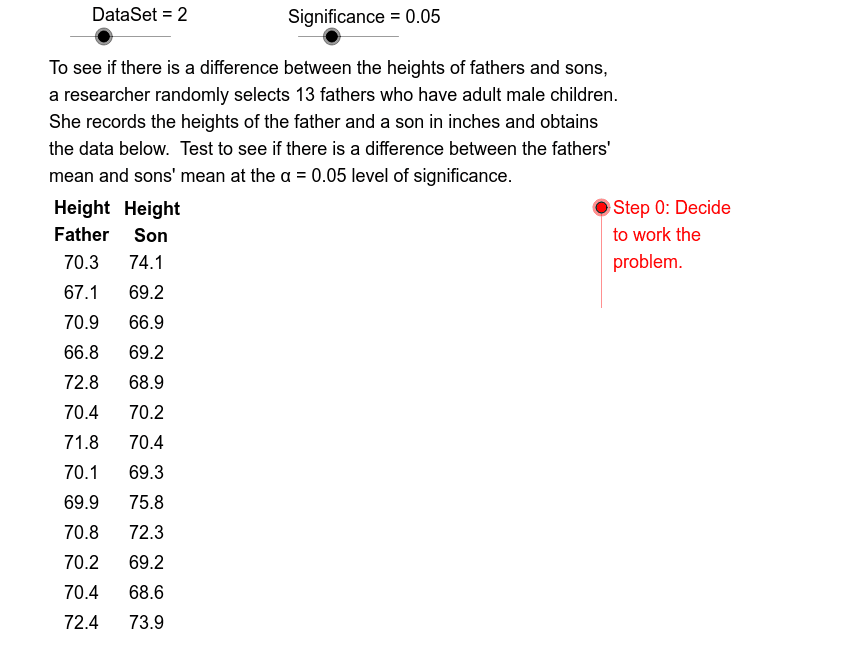
This example demonstrates the steps involved in performing the dependent difference test (matched-pairs design) in statistics. It covers core concepts like mean, sample standard deviation, and significance testing. Constructed using GeoGebra commands like Element, Length, Sequence, Mean, SampleSD, If, and involves objects such as Data13A, Data13B, Mean, StdDev. Suitable for high school students and beginners in statistics learning the dependent difference test method.
GeoGebra Commands & Parameters
Element(DtSqA, DataSet) → DataAElement(DtSqB, DataSet) → DataBLength(DataA) → SizeElement(ConfSeq, signif) → ConfidenceElement(LblALst, DataSet) → LblAElement(LblBLst, DataSet) → LblBSequence(Element[DataA, k] - Element[DataB, k], k, 1, Size) → DiffMean(Diff) → XbarSampleSD(Diff) → StdDevIf(Pvalue < α, 1, 0) → CmprIf(Cmpr ≟ 1, "reject", "keep") → DcsnIf(Cmpr ≟ 1, "is", "is not") → ConStmtElement(StmtSeq, DataSet) → StmtIf(Pvalue < α, " < ", " ≥ ") → IneqSqnSequence(Text[Element[DataA, k], (0.8, 6.5 - 0.6 * k)], k, 1, Size) → LstDtASequence(Text[Element[DataB, k], (2.1, 6.5 - 0.6 * k)], k, 1, Size) → LstDtBSequence(Text[Element[Diff, k], (3.8, 6.5 - 0.6 * k)], k, 1, Size) → LstDiff