
Statistics Vocabulary
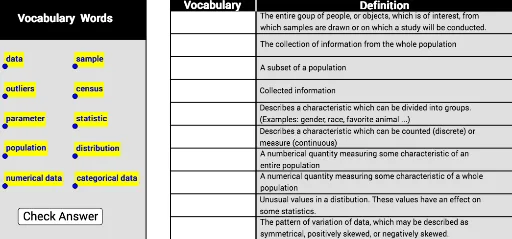
Loading the math board and drawing, please wait…
This example demonstrates statistical vocabulary through interactive GeoGebra constructions involving integers, similar triangles, rotations, rhombuses, and quadratic equations. Key GeoGebra commands used include Corner, Segment, Polygon, and Midpoint to create geometric figures and text elements. Suitable for high school mathematics education or self-study to enhance understanding of statistical and geometric concepts.
GeoGebra Commands & Parameters
Corner(1) → ACorner(2) → BCorner(3) → CCorner(4) → DSegment(A, B) → fSegment(A, D) → gPolygon(A, E, F, D) → poly1, a_1, e, f_1, dPolygon(G, H, F, D) → poly2, g_1, h, f_2, d_1Polygon(T, S, B, C) → poly3, t, s, b, cPolygon(T, F_1, D_2, C) → poly4, t_1, f_3, d_2, c_1Segment(T, S) → iSegment(R_1, G_1) → jSegment(C, B) → kSegment(E_1, C_2) → lSegment(D_1, B_2) → mSegment(C_1, A_2) → nSegment(B_1, Z_1) → pSegment(A_1, W_1) → qSegment(Z, V_1) → rSegment(W, U_1) → h_1Segment(V, T_1) → i_1Segment(U, S_1) → j_1Midpoint(Q_1, D_2) → E_2Midpoint(F_1, Q_1) → F_2Polygon(Q_1, D_2, B, G_1) → poly5, q_1, d_3, b_1, g_2Segment(Q_1, R_1) → k_1
AI Drawing Prompt Reference
Draw a quadrilateral with four vertices A, B, C, and D, then connect the diagonals to form four triangles. Next, draw two rhombuses and two triangles inside the quadrilateral, ensuring they intersect the sides of the quadrilateral. Finally, add some auxiliary lines, such as midlines and midpoints of diagonals, to help understand the geometric relationships.
The prompt above was compiled from the original drawing commands and is for reference only.