
SSA Triangle: The Ambiguous Case
Loading the math board and drawing, please wait…
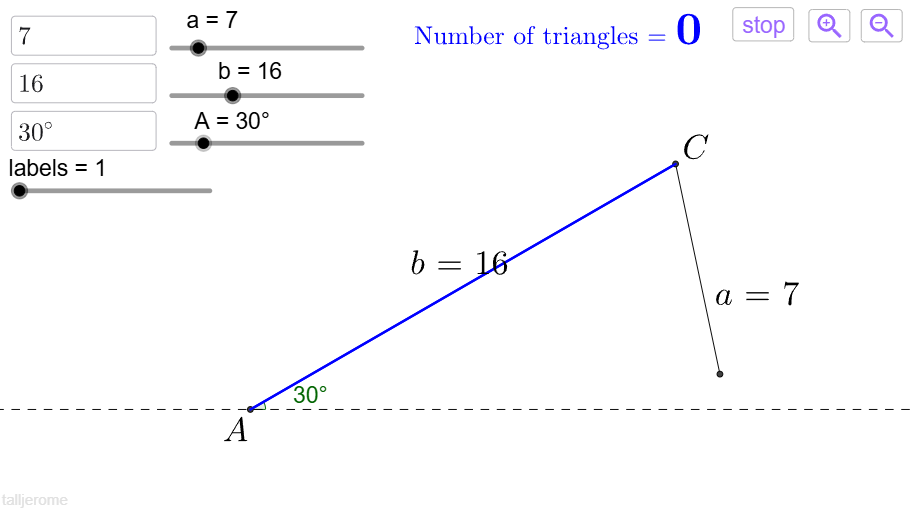
This example illustrates the SSA case for triangles, where two sides and one of their opposite angles are given, leading to an ambiguous situation. Key mathematical concepts include trigonometry and triangle properties. Using GeoGebra commands such as Circle, Intersect, Segment, and Angle, the construction process is dynamically demonstrated. Suitable for high school precalculus or trigonometry courses.
GeoGebra Commands & Parameters
Circle(C, a04SidePendulum) → dIntersect(xAxis, yAxis) → ASegment(A, C) → bAngle(B_2, C, B_1) → βIf(a04SidePendulum ≥ (b * sin(a06AngleGiven)), β, sweepdefault) → sweepSegment(C, B) → aAngle((1, 0), A, C) → αPolygon(A, C, B_2) → poly2, b_2, a_2, c_2Polygon(A, C, B_1) → poly1, b_1, a_1, c_1Corner(5) → dimsIf(a07labels ≤ 2, "A", If[a07labels ≤ 4, "B", "C"]) → text1aIf(a06AngleGiven < 90°, If[a04SidePendulum < (a05SideGiven * sin(a06AngleGiven)), 0, (a05SideGiven * sin(a06AngleGiven)) < a04SidePendulum < a05SideGiven, 2, 1], If[a05SideGiven < a04SidePendulum, 1, 0]) → numtrianglesTextfield(a06AngleGiven) → a03InputBox3Textfield(SidePendulumTemp) → a01InputBox1Textfield(SideGivenTemp) → a02InputBox2Max(RemoveUndefined[{x(A), x(B_1), x(B_2), x(C) + abs(((a05SideGiven * sin(a06AngleGiven)) * sin(sweepdefault / 2)))}]) → xmax0Min(If[Defined[B_1], {x(A), x(B_1), x(B_2), x(C)}, {x(A), x(C), x(C) - abs((a04SidePendulum * sin(sweep / 2)))}]) → xmin0Max(RemoveUndefined[{y(A), y(B_1), y(B_2), y(C), y(C) - a04SidePendulum}]) → ymax0Min(If[Defined[B_1], {y(A), y(B_1), y(B_2), y(C), y(C) - a04SidePendulum}, {y(A), y(C), y(C) - a04SidePendulum}]) → ymin0PolyLine((xmin0, ymin0), (xmax0, ymin0), (xmax0, ymax0), (xmin0, ymax0), (xmin0, ymin0)) → windowframe0If(xcenterratio ≥ 0.5, xcenter0 - ((xmax0 - xcenter0) * xcenterratio / (1 - xcenterratio)), xmin0) → xmin1If(xcenterratio ≥ 0.5, xmax0, xcenter0 + ((xcenter0 - xmin0) * (1 - xcenterratio) / xcenterratio)) → xmax1If(ycenterratio ≥ 0.5, ycenter0 - ((ymax0 - ycenter0) * ycenterratio / (1 - ycenterratio)), ymin0) → ymin1If(ycenterratio ≥ 0.5, ymax0, ycenter0 + ((ycenter0 - ymin0) * (1 - ycenterratio) / ycenterratio)) → ymax1PolyLine((xmin1, ymin1), (xmax1, ymin1), (xmax1, ymax1), (xmin1, ymax1), (xmin1, ymin1)) → windowframe1If(windowratio1 > dimsratio, ymax1, ycenter1 + (dimsratio * (xmax1 - xcenter1))) → ymax2If(windowratio1 < dimsratio, xmax1, xcenter1 + (ymax1 - ycenter1) / (dimsratio)) → xmax2PolyLine((xmin2, ymin2), (xmax2, ymin2), (xmax2, ymax2), (xmin2, ymax2), (xmin2, ymin2)) → windowframe2PolyLine((xmin3, ymin3), (xmax3, ymin3), (xmax3, ymax3), (xmin3, ymax3), (xmin3, ymin3)) → windowframe3Max(RemoveUndefined[tempL1]) → cRemoveUndefined({x(A), x(B_1), x(B_2), x(C) + abs((a04SidePendulum * sin(sweepdefault / 2)))}) → tempL2
AI Drawing Prompt Reference
Draw a triangle with two sides a and b, and the angle α opposite side a. According to the SSA condition, there may be 0, 1, or 2 solutions. First, draw side b, then draw a circle with center C and radius a, intersecting the x-axis at point A. Next, draw angle α, connect point A and C to form side b. Depending on the given side a and angle α, there may be 0, 1, or 2 solutions, and mark the possible triangles with different colors.
The prompt above was compiled from the original drawing commands and is for reference only.