
Squared Square
Loading the math board and drawing, please wait…
In collections
Cutting up squares
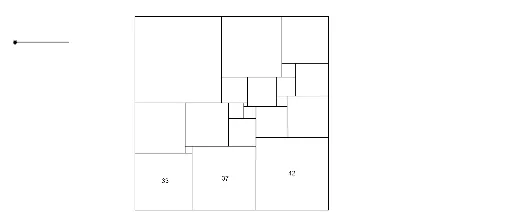
This example demonstrates the construction and transformation of a geometric figure. Core math concepts include coordinate geometry, geometric construction, and optimization. It utilizes GeoGebra commands such as Intersect, Segment, Circle, OrthogonalLine, and Line. Suitable for high school and university-level mathematics education.
GeoGebra Commands & Parameters
Intersect(xAxis, yAxis) → DSegment(D, C) → aSegment(C, E) → bSegment(G, D) → cSegment(G, E) → dCircle(D, A) → eIntersect(e, c, 1) → FOrthogonalLine(A, a) → fOrthogonalLine(F, c) → gIntersect(f, g) → HSegment(F, H) → hSegment(H, A) → iCircle(C, B) → kIntersect(k, b, 1) → IOrthogonalLine(I, b) → jOrthogonalLine(B, a) → lIntersect(j, l) → JSegment(J, I) → mSegment(J, B) → nCircle(F, 29) → pIntersect(p, c, 1) → KOrthogonalLine(K, c) → qCircle(K, 29) → rIntersect(r, q, 2) → LCircle(G, 50) → sIntersect(s, d, 1) → MOrthogonalLine(M, d) → tIntersect(q, t) → NSegment(M, N) → a_1OrthogonalLine(L, q) → b_1Intersect(b_1, h) → OSegment(L, O) → c_1Segment(K, N) → d_1Circle(O, 4) → e_1Intersect(e_1, c_1, 1) → POrthogonalLine(P, c_1) → f_1Intersect(f_1, n) → QSegment(P, Q) → g_1OrthogonalLine(H, h) → h_1Intersect(h_1, g_1) → RSegment(R, H) → i_1Circle(E, 27) → k_1Intersect(k_1, d, 1) → SIntersect(k_1, b, 1) → TOrthogonalLine(S, d) → j_1OrthogonalLine(T, b) → l_1Intersect(j_1, l_1) → USegment(S, U) → m_1Segment(U, T) → n_1Circle(T, 19) → p_1Intersect(p_1, n_1, 1) → VIntersect(p_1, b, 1) → WOrthogonalLine(V, n_1) → q_1OrthogonalLine(W, b) → r_1Intersect(q_1, r_1) → ZSegment(V, Z) → s_1Segment(Z, W) → t_1Circle(I, 24) → c_2Intersect(c_2, m, 1) → A_1OrthogonalLine(A_1, m) → a_2OrthogonalLine(Z, b) → b_2Intersect(a_2, b_2) → B_1Segment(B_1, W) → d_2Segment(B_1, A_1) → e_2Circle(M, 35) → f_2Intersect(f_2, a_1, 1) → C_1OrthogonalLine(C_1, a_1) → g_2Intersect(g_2, s_1) → D_1Segment(C_1, D_1) → h_2OrthogonalLine(U, h_2) → i_2Intersect(i_2, h_2) → E_1Segment(U, E_1) → j_2Circle(D_1, 11) → k_2Intersect(k_2, h_2, 1) → F_1Circle(A_1, 18) → p_2Intersect(p_2, e_2, 1) → G_1OrthogonalLine(G_1, e_2) → l_2OrthogonalLine(J, m) → m_2Intersect(l_2, m_2) → H_1Segment(H_1, G_1) → n_2Segment(H_1, J) → q_2Circle(G_1, 6) → r_2OrthogonalLine(B_1, e_2) → t_2Circle(P, 25) → s_2Intersect(s_2, g_1, 1) → J_1OrthogonalLine(J_1, g_1) → a_3Line(K, L) → b_3Intersect(a_3, b_3) → K_1Circle(K_1, 9) → c_3Intersect(c_3, b_3, 2) → L_1Circle(L_1, 2) → d_3Intersect(d_3, b_3) → M_1, N_1Segment(K_1, N_1) → e_3Segment(L, K_1) → f_3Segment(K_1, J_1) → g_3Circle(J_1, 16) → h_3Intersect(h_3, g_3) → O_1,OrthogonalLine(O_1, g_3) → i_3Intersect(i_3, q_2) → P_1Segment(O_1, P_1) → j_3OrthogonalLine(L_1, j_3) → k_3Intersect(k_3, j_3) → Q_1Segment(L_1, Q_1) → l_3OrthogonalLine(H_1, q_2) → m_3Intersect(m_3, l_3) → R_1OrthogonalLine(N_1, e_3) → n_3Intersect(h_2, n_3) → S_1Segment(R_1, H_1) → p_3Intersect(n_3, p_3) → T_1Segment(S_1, T_1) → q_3Circle(T_1, 17) → r_3Intersect(r_3, n_2, 1) → U_1Segment(F_1, U_1) → s_3OrthogonalLine(B_1, e_2) → t_3Intersect(t_3, s_3) → V_1Segment(V_1, B_1) → a_4
AI Drawing Prompt Reference
Draw a geometric figure starting from the intersection of coordinate axes. Connect the intersection with two other points to form line segments. Draw a circle with one point as the center, intersecting the line segments at new points. Create perpendicular lines from these points, connecting them to form new shapes. Repeat the process with other points as centers, intersecting line segments and drawing perpendiculars to build a complex pattern of connected circles and lines, showcasing geometric construction and optimization.
The prompt above was compiled from the original drawing commands and is for reference only.