
Square Side from Area
Loading the math board and drawing, please wait…
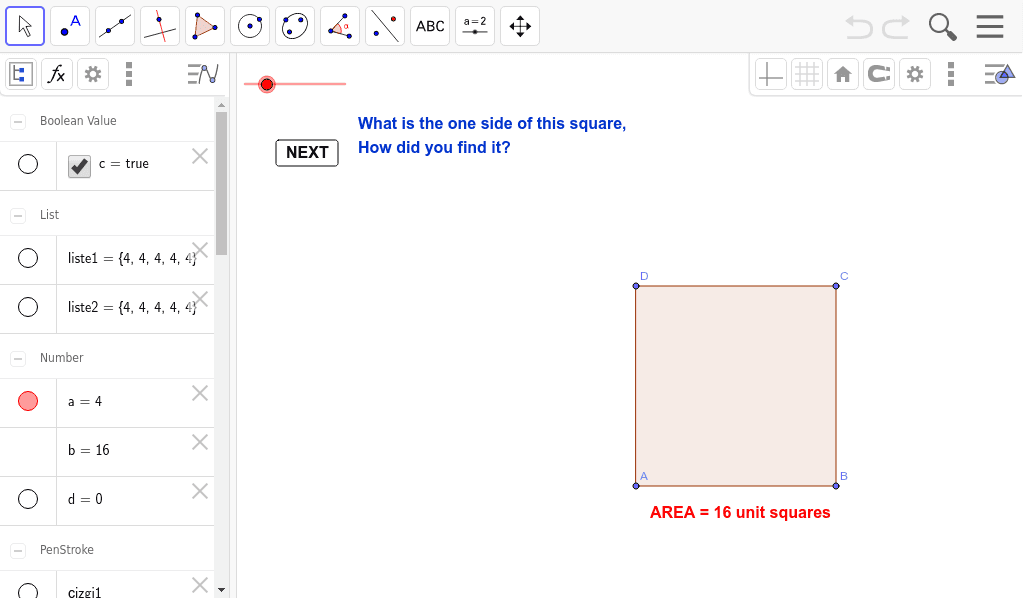
This example demonstrates how to calculate the side length of a square from its area, showcasing the inverse operation of square root. Key math concepts include area formulas, square root calculations, and inverse operations. It is constructed using GeoGebra commands like Sequence, Polygon, Area, AttachCopyToView, Vector, and Point. Suitable for middle school students and above learning square roots, area calculations, and inverse operations in calculus.
GeoGebra Commands & Parameters
Sequence(Segment[(0, i), (a, i)], i, 0, a, 1) → liste1Sequence(Segment[(i, 0), (i, a)], i, 0, a, 1) → liste2Polygon({(0, 0), (a, 0), (a, a), (0, a)}) → çokgen1, , , ,Area(çokgen1) → bAttachCopyToView(PolyLine[(-5.4200000000000035, 1.8200000000000018), (-5.360000000000003, 1.880000000000002), (-5.300000000000003, 1.900000000000002), (-5.260000000000003, 1.960000000000002), (-5.200000000000003, 2.020000000000002), (-5.160000000000003, 2.080000000000002), (-5.120000000000003, 2.140000000000002), (-5.080000000000003, 2.200000000000002), (-5.040000000000003, 2.260000000000002), (-4.980000000000003, 2.280000000000002), (-4.920000000000003, 2.320000000000002), (-4.860000000000003, 2.360000000000002), (-4.940000000000003, 2.360000000000002), (-5.020000000000003, 2.360000000000002), (-5.100000000000003, 2.360000000000002), (-5.020000000000003, 2.360000000000002), (-4.940000000000003, 2.360000000000002), (-4.860000000000003, 2.360000000000002), (-4.780000000000003, 2.360000000000002), (-4.700000000000003, 2.360000000000002), (-4.7600000000000025, 2.300000000000002), (-4.8000000000000025, 2.240000000000002), (-4.820000000000003, 2.180000000000002), (-4.8400000000000025, 2.120000000000002), (NaN, NaN), (-6.700000000000004, 1.8200000000000018), (-6.700000000000004, 1.900000000000002), (-6.700000000000004, 1.9800000000000018), (-6.700000000000004, 2.060000000000002), (-6.760000000000003, 2.100000000000002), (-6.800000000000003, 2.160000000000002), (-6.840000000000003, 2.220000000000002), (-6.8800000000000034, 2.280000000000002), (-6.9200000000000035, 2.340000000000002), (-6.940000000000004, 2.400000000000002), (-6.980000000000004, 2.340000000000002), (-6.980000000000004, 2.260000000000002), (-6.980000000000004, 2.180000000000002), (-6.980000000000004, 2.260000000000002), (-6.980000000000004, 2.340000000000002), (-6.980000000000004, 2.420000000000002), (-6.980000000000004, 2.500000000000002), (-6.980000000000004, 2.5800000000000023), (-6.9200000000000035, 2.5400000000000023), (-6.900000000000004, 2.480000000000002), (-6.8800000000000034, 2.420000000000002), (-6.820000000000004, 2.360000000000002), (-6.760000000000003, 2.340000000000002), (-6.700000000000004, 2.300000000000002), true], 1, (-7.980000000000004, -3.08), (15.020000000000005, 8.660000000000004), (0, 587), (1150, 0)) → çizgi1Vector((-0.3, 0), (-0.3, a)) → uVector((0, a + 0.3), (a, a + 0.3)) → vAttachCopyToView(PolyLine[(-6.500000000000004, 4.8000000000000025), (-6.5800000000000045, 4.8000000000000025), (-6.640000000000005, 4.820000000000003), (-6.700000000000005, 4.860000000000003), (-6.780000000000005, 4.860000000000003), (-6.860000000000005, 4.860000000000003), (-6.920000000000005, 4.880000000000003), (-7.000000000000004, 4.880000000000003), (-7.060000000000005, 4.8400000000000025), (-7.1200000000000045, 4.8000000000000025), (-7.140000000000005, 4.740000000000003), (-7.140000000000005, 4.660000000000003), (-7.140000000000005, 4.580000000000003), (-7.1200000000000045, 4.520000000000003), (-7.0800000000000045, 4.460000000000003), (-7.0400000000000045, 4.400000000000003), (-7.000000000000004, 4.3400000000000025), (-6.940000000000005, 4.3000000000000025), (-6.860000000000005, 4.3000000000000025), (-6.780000000000005, 4.3000000000000025), (-6.700000000000005, 4.3000000000000025), (-6.6200000000000045, 4.3000000000000025), (-6.560000000000005, 4.280000000000003), (-6.460000000000004, 4.280000000000003), (-6.420000000000004, 4.3400000000000025), (-6.380000000000004, 4.400000000000003), (-6.380000000000004, 4.480000000000003), (-6.400000000000005, 4.540000000000003), (-6.400000000000005, 4.620000000000003), (-6.400000000000005, 4.700000000000003), (-6.420000000000004, 4.7600000000000025), (-6.480000000000005, 4.780000000000003), (-6.5400000000000045, 4.8000000000000025), (-6.600000000000005, 4.820000000000003), (-6.680000000000005, 4.820000000000003), true], 1, (-7.980000000000005, -3.08), (15.020000000000003, 8.660000000000004), (0, 587), (1150, 0)) → çizgi2Point({(0, 0)}) → APoint({(a, 0)}) → BPoint({(a, a)}) → CPoint({(0, a)}) → D
AI Drawing Prompt Reference
Draw a square with side length a, with vertices at the origin, on the x-axis, at the opposite corner, and on the y-axis. Inside the square, create a grid of equally spaced horizontal and vertical line segments with spacing of 1 unit. Add an arrowed line segment on the left side and another above the square to indicate the side length a. Next to the figure, include a text label showing the area value of the square)Skip the text label if not needed. Keep the layout clear to emphasize the relationship between the area and side length of the square.
The prompt above was compiled from the original drawing commands and is for reference only.