
Square Roots, Root and Square Functions Visualization
Loading the math board and drawing, please wait…
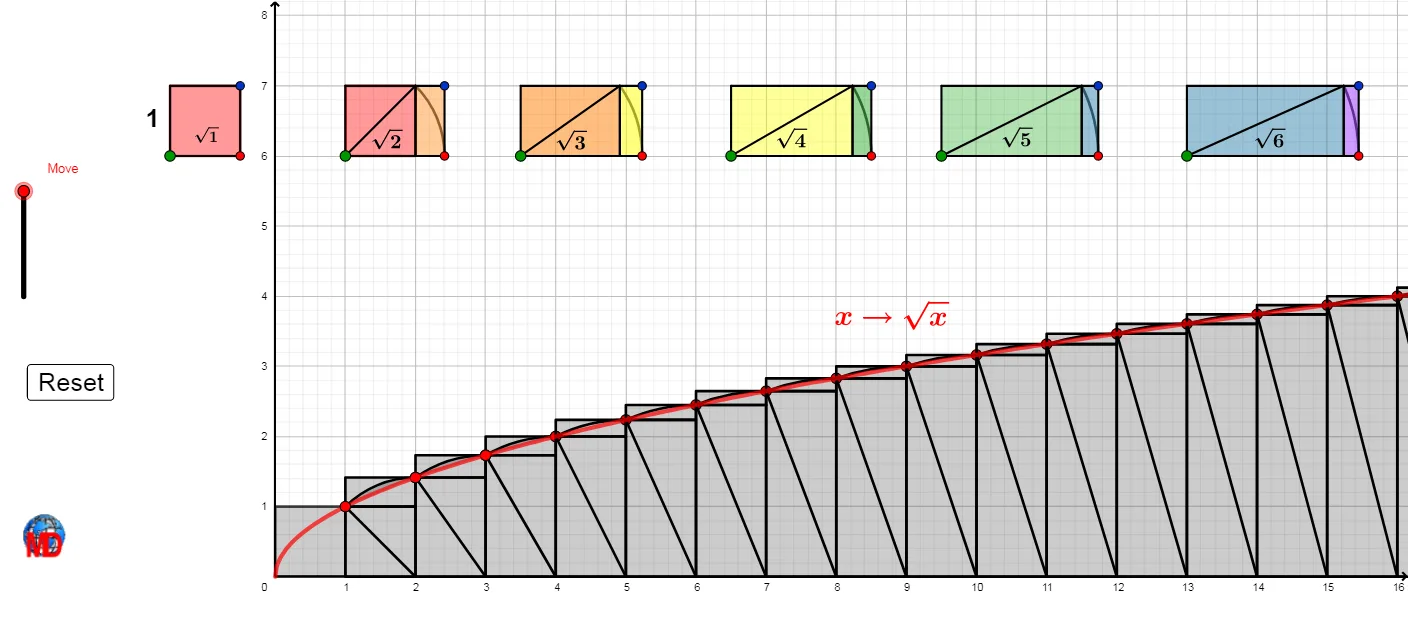
① This GeoGebra example dynamically illustrates the relationship between square root functions, root functions, and square functions, highlighting the symmetry of inverse functions across the line y=x. ② Core mathematical concepts include square roots, squaring, function graphs, inverse functions, symmetry, and function transformations. ③ Construction details: Using commands such as Polygon, Segment, Ray, Circle, Intersect, Line, CircleArc, Point, Translate, Sequence, Centroid, and Midpoint, the construction creates multiple function graphs (e.g., f, g, h, i) along with auxiliary geometric objects like points, segments, polygons, and arcs to demonstrate the correspondence between squaring and rooting, including rotations and translations. ④ Suitable for middle and high school students learning functions and radical expressions, as well as for teachers demonstrating function symmetry and transformations in class, helping learners grasp the geometric meaning of square and square root as inverse operations.
GeoGebra Commands & Parameters
Polygon(C, D, 4) → poly1, f, g, h, i, E, FPolygon(G, H, 4) → poly2, j, k, l, m, I, JSegment(G, I) → nRay(G, H) → pCircle(G, I) → cIntersect(c, p) → K,Line(K, k) → qRay(J, I) → rIntersect(r, q) → LPolygon(I, L, K, H) → q1, i_1, l_1, k_1, h_1CircleArc(G, K, I) → dPoint(j) → OPolygon(M, N, P, Q) → q2, m_1, n_1, p_1, q_1Circle(M, P) → eRay(M, N) → sIntersect(e, s) → R,Polygon(N, R, S, P) → q3, n_2, r_1, s_1, p_2Segment(M, P) → tCircleArc(M, R, P) → c_1Polygon(T, U, W, V) → q4, t_1, u, w, vRay(T, U) → aCircle(T, W) → d_1Intersect(d_1, a) → Z,Polygon(U, Z, A_1, W) → q5, u_1, z_1, a_1, w_1CircleArc(T, Z, W) → e_1Segment(T, W) → bPolygon(B_1, C_1, E_1, D_1) → q6, b_1, f_1, g_1, j_1Ray(B_1, C_1) → f_2Circle(B_1, E_1) → c_2Intersect(c_2, f_2) → F_1,Polygon(C_1, F_1, G_1, E_1) → q7, g_2, h_2, i_2, j_2Segment(B_1, E_1) → k_2CircleArc(B_1, F_1, E_1) → d_2Translate(Rotate[poly1, (Move / 10 * π / 2), C], Vector[(Move / 10 * Vector[C, (1, 0)])]) → q8Translate(Rotate[D, (Move / 10 * π / 2), C], Vector[(Move / 10 * Vector[C, (1, 0)])]) → H_1Translate(Rotate[l1, (Move / 10 * π / 2), G], Vector[(Move / 10 * Vector[G, (2, 0)])]) → l2Translate(Rotate[l3, (Move / 10 * π / 2), M], Vector[(Move / 10 * Vector[M, (3, 0)])]) → l4Translate(Rotate[l5, (Move / 10 * π / 2), T], Vector[(Move / 10 * Vector[T, (4, 0)])]) → l6Sequence((i, sqrt(i)), i, 4, 18) → l9Sequence((i, sqrt(i - 1)), i, 4, 18) → l10Sequence((i - 1, sqrt(i)), i, 5, 18) → l12Sequence((i + 1, sqrt(i + 1)), i, 1, 18) → l14Sequence((i, 0), i, 4, 18) → l8Centroid(poly1) → I_1Centroid(q6) → L_1Centroid(q2) → M_1Midpoint(b) → J_1Midpoint(n) → K_1Polygon(N_1, O_1, Q_1, P_1) → q9, l_2, o_1, m_2, a_2Segment(N_1, Q_1) → b_2Ray(N_1, O_1) → e_2Circle(N_1, Q_1) → c_3Intersect(c_3, e_2) → R_1,Polygon(O_1, R_1, S_1, Q_1) → q10, f_3, g_3, h_3, i_3CircleArc(N_1, R_1, Q_1) → d_3Midpoint(b_2) → T_1Point(yAxis) → U_1Point(i) → V_1Sequence(Polygon[Element[l8, i], Element[l8, i + 1], Element[l10, i + 1], Element[l9, i]], i, 1, 18) → l11Sequence(Polygon[Element[l12, i], Element[l9, i + 1], Element[l10, i + 1], Element[l9, i]], i, 1, 18) → l13Sequence(CircleArc[Element[l8, i], Element[l14, i + 2], Element[l14, i + 1]], i, 2, 18) → l15Sequence(Segment[Element[l8, i], Element[l14, i + 1]], i, 2, 18) → l16
AI Drawing Prompt Reference
Draw a graph illustrating square root functions and square functions. Start by plotting the functions f(x) = x^2 and g(x) = √x, then use rotations and translations to demonstrate their symmetry and inverse function relationship. Add auxiliary lines, arcs, and points to highlight the geometric meaning of squaring and square root as inverse operations.
The prompt above was compiled from the original drawing commands and is for reference only.