
Square Pyramid as a Planar Graph
Loading the math board and drawing, please wait…
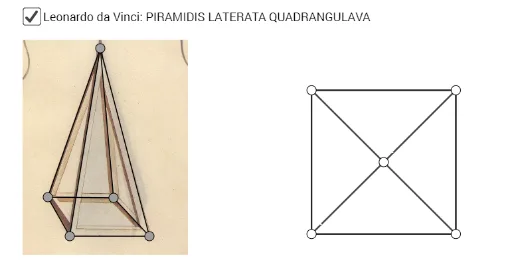
This example demonstrates how to represent a three-dimensional square pyramid (quadrilateral pyramid) as a planar graph, showing the topological structure of vertices, edges, and faces on a two-dimensional plane through projection or unfolding. Core mathematical concepts include solid geometry of pyramids, planar graph theory (vertices and edges), and basic properties of polygons and segments. Construction highlights: using GeoGebra commands such as Polygon to draw the base square and triangular side faces, Midpoint to construct auxiliary midpoints or the apex projection, and Segment to connect the apex to base vertices forming lateral edges. Multiple points (A to J) and segments (a to t) are used to build the complete planar network. This is suitable for upper secondary or early university students to understand the conversion between 3D solids and 2D representations, as well as applications of graph theory in geometry.
GeoGebra Commands & Parameters
Polygon(A, B, 4) → veelhoek1, f, g, h, i, C, DMidpoint(A, C) → ESegment(D, E) → jSegment(E, C) → kSegment(E, B) → lSegment(E, A) → mSegment(F, G) → nSegment(G, H) → pSegment(H, I) → qSegment(I, J) → rSegment(J, G) → sSegment(J, F) → tSegment(F, I) → bSegment(F, H) → c
AI Drawing Prompt Reference
Draw a square pyramid's planar representation with a square base and four triangular side faces. Start by drawing a square base, then create a point at the center of the base as the projection of the apex, and connect this point to the four vertices of the base to form the four lateral edges.
The prompt above was compiled from the original drawing commands and is for reference only.