
Square Cross Sections Perpendicular to x-Axis
Loading the math board and drawing, please wait…
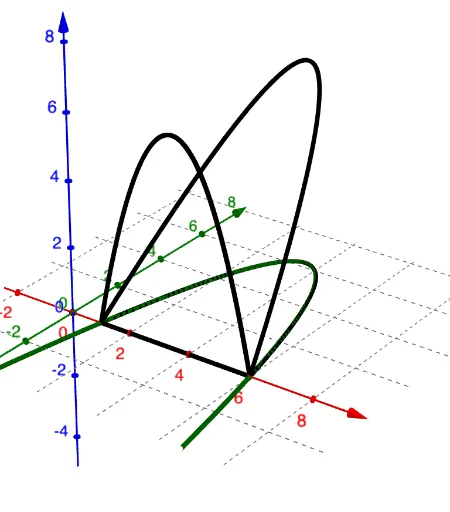
① This example demonstrates how to slice a 3D solid with planes perpendicular to the x-axis, producing a series of square cross sections, and visually illustrates the cross-section method in solid geometry. ② Core mathematical concepts include: the cross-section method, integral calculus for volume, the relationship between function graphs and planar sections, and how square cross sections vary with the x-coordinate. ③ Construction highlights: Based on the construction summary, the GeoGebra command CurveCartesian is used to draw curves, and objects f, a, aa, bb, b are defined, likely to control the position, size, or parameters of the sections, enabling dynamic movement along the x-axis via sliders or dynamic geometry. ④ Suitable for high school or early college students to understand the application of definite integrals in volume calculation and to enhance spatial visualization skills.
GeoGebra Commands & Parameters
CurveCartesian(t, f(t), 0, t, 1, 6) → aCurveCartesian(t, f(t), f(t), t, 1, 6) → aaCurveCartesian(t, 0, f(t), t, 1, 6) → bbCurveCartesian(t, 0, 0, t, 1, 6) → b
AI Drawing Prompt Reference
Create a 3D solid showing square cross sections perpendicular to the x-axis. Over the interval from x=1 to x=6, define the solid by four boundary curves: a base line along the x-axis, a curve in the xy-plane, a curve in the xz-plane, and a space curve connecting them. Then, slice the solid with planes perpendicular to the x-axis, producing a series of square cross sections whose side lengths vary with x, equal to the function value at that position. Arrange these squares along the x-axis to illustrate the cross-section method for volume by integration.
The prompt above was compiled from the original drawing commands and is for reference only.