
Spiraling Cube Faces
Loading the math board and drawing, please wait…
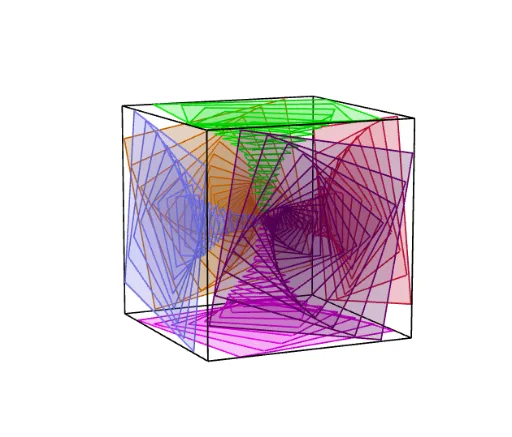
This example demonstrates a cube with its faces spiraling along a dynamic path. It involves core math concepts like solid geometry, similar triangles, equations, and tangent lines. Construction highlights include using commands like Point, Cube, Sequence, and Rotate in GeoGebra. Suitable for high school and above students studying spatial geometry, dynamic transformations, and mathematical modeling.
GeoGebra Commands & Parameters
Point(Circle[B, Distance[A, B], Segment[A, B]]) → CCube(A, B, C) → a, D, faceCDHG, faceEFGH, edgeAD, edgeAB, edgeBC, edgeCD, edgeAE, edgeDH, edgeEH, edgeEF, E, edgeBF, edgeFG, edgeCG, edgeGH, F, G, H, faceABCD, faceADHE, faceABFE, faceBCGFSequence((0, a, 0), a, -1, 0, 0.05) → L_2Sequence(Dilate[Rotate[faceABFE, (w * π / 18), yAxis], 0.85^(w), Element[L_2, w]], w, 1, Length[L_2]) → L_1Rotate(L_1, π / 2) → L_3Rotate(L_1, (2 * π / 2)) → L_4Rotate(L_1, (3 * π / 2)) → L_5Rotate(L_1, π / 2, xAxis) → L_6Rotate(L_1, ((-π)) / 2, xAxis) → L_7
AI Drawing Prompt Reference
Draw a cube with its faces spiraling along a dynamic path. Start by creating a cube, then rotate and scale it around an axis to create a spiral effect. Finally, place these rotated and scaled faces sequentially to form the spiral cube surface.
The prompt above was compiled from the original drawing commands and is for reference only.