
Spinner Probability Demo
Loading the math board and drawing, please wait…
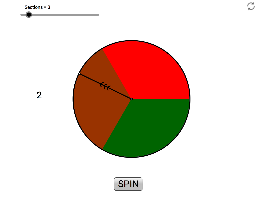
This example demonstrates how to construct a customizable spinner (2 to 12 sections) in GeoGebra and visualize its probability distribution. Core math concepts include Probability & Statistics, Geometric Construction, and Parametric Equations. The construction utilizes commands like Intersect, Circle, CircleSector, Random, Segment, and Text. Suitable for high school students learning probability and geometry, or for educational demonstrations.
GeoGebra Commands & Parameters
Intersect(xAxis, yAxis) → ACircle(A, 1) → cCircleSector(A, B, C) → dCircleSector(A, C, D) → eCircleSector(A, D, E) → fCircleSector(A, E, F) → gCircleSector(A, F, G) → hCircleSector(A, G, H) → kCircleSector(A, H, I) → pCircleSector(A, I, J) → qCircleSector(A, J, K) → rCircleSector(A, K, L) → sCircleSector(A, L, M) → tCircleSector(A, M, B) → c_1Random(0, 359) → EXSegment(A, TIP) → arrowText(Value) → text1
AI Drawing Prompt Reference
Draw a customizable spinner with 2 to 12 sectors, centered at the origin with a radius of 1, each sector in different colors, and include an arrow pointing to a randomly generated angle position, labeled with the angle value at the tip.
The prompt above was compiled from the original drawing commands and is for reference only.