
Sphere with Four Holes: Parametric Surface and Inscribed Circles
Loading the math board and drawing, please wait…
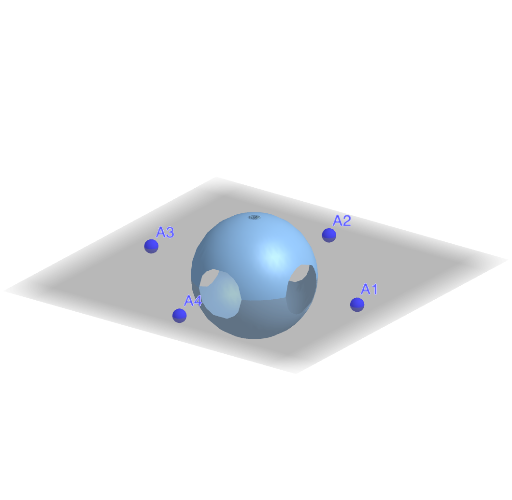
This example demonstrates a 3D sphere with four circular holes removed, created using parametric surface equations to form a multi-hole structure. The core mathematical concepts involve parametric surfaces, spherical coordinates, inscribed circles, and quadratic functions. Construction highlights: using GeoGebra's Surface command combined with Zip and Product functions to generate the parametric surface, with a button (button1) to toggle visibility, and lists (LA, LB, Lcos, Lind) along with index variables (ind, inX, inY, inZ) to compute hole positions and radii, with dmax and r determining hole sizes. Suitable for high school or university students learning solid geometry, parametric equations, and 3D modeling, as well as for mathematical visualization or exploring topological properties of surfaces.
GeoGebra Commands & Parameters
Zip((r / abs(A) * A), A, LA) → LBZip(((x * x(B)) + (y * y(B)) + (z * z(B))) / r^(2), B, LB) → LcosZip(ind(F(inX(x, y), inY(x, y), inZ(x, y))), F, Lcos) → LindProduct(Element[Lind, k], k, 1, 4) → pSurface((p(ϕ, θ) * inX(ϕ, θ)), inY(ϕ, θ), inZ(ϕ, θ), ϕ, 0, π, θ, 0, (2 * π)) → surf
AI Drawing Prompt Reference
Draw a 3D sphere with four circular holes. The holes' radii and positions are determined by parameters. The sphere surface is generated using parametric equations. Visibility of the holes can be toggled with a button. Construct by first drawing the sphere, then adding holes, and finally adjusting hole sizes and positions.
The prompt above was compiled from the original drawing commands and is for reference only.